

The Bottom Line
Kinsta is ranked #5 in our Hosting & Cloud category. Managed WordPress on Google Cloud with Cloudflare Enterprise on every plan. We rate it 4.8/5.
Best for
Businesses where WordPress is a revenue channel; WooCommerce stores that lose money when pages are slow.
Considerations
Hobby sites and personal blogs; sites with large media libraries constrained by the 10 GB allowance.
Executive Summary & Independent Verdict
Almost every review of Kinsta reaches the same conclusion - “expensive but worth it” - and almost none of them explain the pricing well enough for you to check that claim against your own site. That gap exists partly because the search results for this product are dominated by affiliate content, and partly because Kinsta’s plan structure is genuinely unusual.
It sells two variants at the same price: one metered by monthly visits, one with no visit limit but a fixed CDN allowance. Single 35k and Single 20GB both cost $35 per month. Choosing the wrong one is the most common and most avoidable mistake a new customer makes, and no review we found explains the distinction clearly.
There is a second detail nobody highlights, and it reframes what you are actually buying: disk space stays at 10 GB from the $35 plan all the way to the $170 plan. Across a fivefold price increase, storage does not move. You are buying CDN capacity and traffic headroom, not room for files.
We place Kinsta at #5 in Hosting & Cloud. It is the strongest managed WordPress host in this list on infrastructure and support, and it is priced for sites where WordPress is a revenue channel rather than a hobby.
Decoding Kinsta’s Pricing Matrix
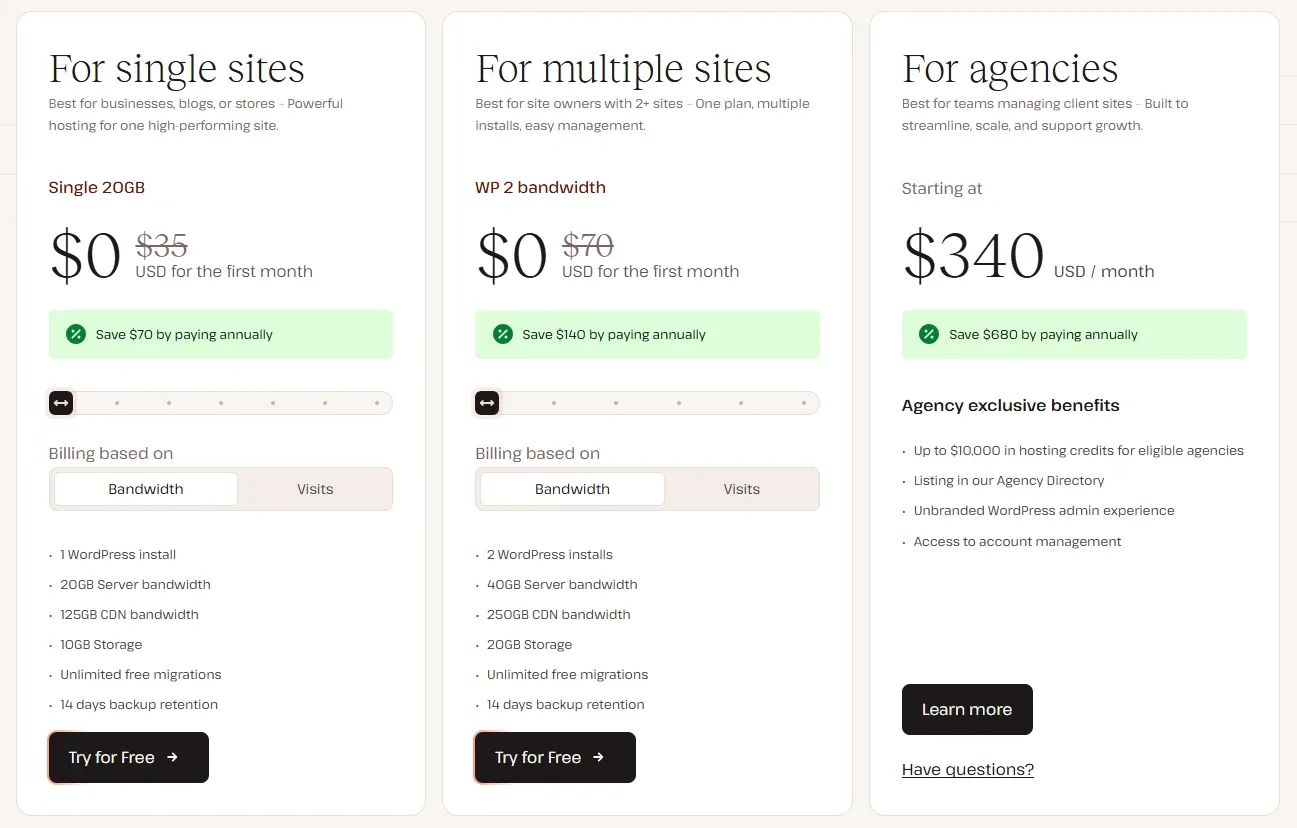
Two axes, one price
Kinsta sells along two parallel dimensions:
- Visit-metered plans (Single 35k, Single 65k, Single 125k and so on) - a capped number of monthly visits with a fixed CDN allowance.
- Capacity plans (Single 20GB, Single 40GB, Single 65GB and so on) - no stated visit limit, sold by CDN allowance.
Both variants at each tier cost exactly the same. The choice is about which constraint matches your traffic profile:
- Predictable, steady traffic favours the visit-metered variant. It is easier to reason about, and if you know you get 40,000 visits a month you know which plan you need.
- Spiky traffic, or traffic dominated by heavy media, favours the capacity variant. A campaign that triples your visits for a week will not push you past a visit counter that does not exist.
A useful way to decide: if you can state your monthly visits with confidence, buy visits. If you cannot, or if your pages are image-heavy enough that bandwidth is the binding constraint, buy capacity.
Business plans, single site
| Plan | Monthly | Annual | Visits | Storage | CDN |
|---|---|---|---|---|---|
| Single 20GB | $35 | $350 | Not metered | 10 GB | 125 GB |
| Single 35k | $35 | $350 | 35,000 | 10 GB | 125 GB |
| Single 40GB | $50 | $500 | Not metered | 10 GB | 250 GB |
| Single 65k | $50 | $500 | 65,000 | 10 GB | 250 GB |
| Single 65GB | $90 | $900 | Not metered | 10 GB | 500 GB |
| Single 125k | $90 | $900 | 125,000 | 10 GB | 500 GB |
| Single 125GB | $170 | $1,700 | Not metered | 10 GB | 750 GB |
| Single 315k | $170 | $1,700 | 315,000 | 10 GB | 750 GB |
| Single 250GB | $290 | $2,900 | Not metered | 15 GB | 1,000 GB |
| Single 500k | $290 | $2,900 | 500,000 | 15 GB | 1,000 GB |
| Single 500GB | $375 | $3,750 | Not metered | 15 GB | 1,500 GB |
| Single 750k | $375 | $3,750 | 750,000 | 15 GB | 1,500 GB |
Business plans, multiple sites
| Plan | Monthly | Annual | Installs | Storage | CDN |
|---|---|---|---|---|---|
| WP 2 | $70 | $700 | 2 | 20 GB | 250 GB |
| WP 5 | $115 | $1,150 | 5 | 30 GB | 500 GB |
| WP 10 | $225 | $2,250 | 10 | 40 GB | 750 GB |
| WP 20 | $340 | $3,400 | 20 | 50 GB | 1,000 GB |
| WP 40 | $450 | $4,500 | 40 | 60 GB | 1,500 GB |
Agency plans
| Plan | Monthly | Annual | Installs | Visits | Storage | CDN |
|---|---|---|---|---|---|---|
| Agency 20 | $340 | $3,400 | 20 | 500,000 | 50 GB | 1,000 GB |
| Agency 40 | $450 | $4,500 | 40 | 750,000 | 100 GB | 1,500 GB |
| Agency 60 | $675 | $6,750 | 60 | 1,250,000 | 150 GB | 2,500 GB |
Cost per site falls sharply on multi-site plans
Our own arithmetic from the table above shows the multi-site economics clearly:
| Plan | Sites | Monthly | Per site |
|---|---|---|---|
| Single | 1 | $35 | $35.00 |
| WP 2 | 2 | $70 | $35.00 |
| WP 5 | 5 | $115 | $23.00 |
| WP 10 | 10 | $225 | $22.50 |
| WP 20 | 20 | $340 | $17.00 |
| WP 40 | 40 | $450 | $11.25 |
The per-site cost falls by roughly two thirds between one site and forty. For an agency, that curve is the entire commercial argument - and it means the correct comparison is not Kinsta against a budget host at $10 per site, but Kinsta at $11.25 per site against that same budget host with the support burden included.
Annual billing is ten months
Every annual price is exactly ten times the monthly one. Paying yearly saves two months, roughly 16.7 per cent - consistent across the entire range, with no tier-specific discount to hunt for. (Our arithmetic, from the published figures above.)
Storage is the real ceiling
Follow the storage column down the single-site table: 10 GB at $35, and still 10 GB at $170. It only moves to 15 GB at $290.
For a content site with text and optimised images, 10 GB is ample and will remain so for years. For a media-heavy site, a WooCommerce store with large product galleries, or anything accumulating uploads over a long period, this is the constraint that will bind first - long before you exhaust the CDN allowance you are actually paying for.
The practical implication is that Kinsta’s pricing ladder is built for traffic growth, not content growth. If your site gets larger rather than busier, the ladder does not serve you well, and it is worth checking your current disk usage before assuming a plan fits.
Infrastructure
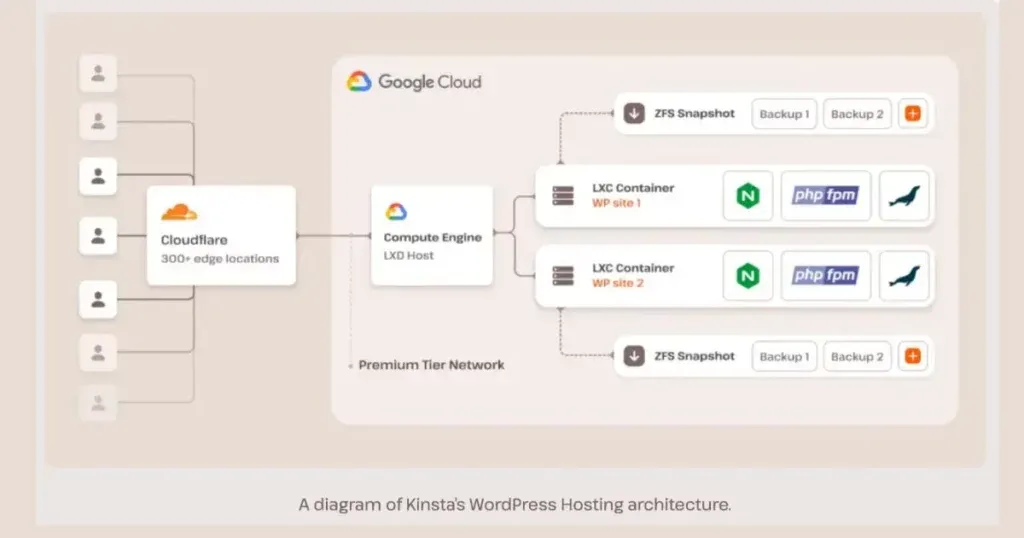
Google Cloud
Kinsta runs exclusively on Google Cloud Platform. That is a meaningful differentiator against hosts running on commodity hardware or resold VPS capacity, and it is the foundation of the performance results Kinsta consistently posts in independent speed tests.
It also has a governance implication that matters to some buyers: the underlying infrastructure is operated by a hyperscaler with published compliance certifications, rather than by the hosting company itself.
Per-site container isolation
Every site runs in its own isolated container with dedicated resources.
The practical benefit is the absence of the “noisy neighbour” problem that defines shared hosting. On a shared server, another customer’s traffic spike, plugin runaway or compromise consumes CPU that your site needed. With per-site isolation, your resources are yours. For anyone who has watched a site slow down for reasons entirely outside their control, this is the difference that justifies managed hosting in the first place.
Cloudflare Enterprise, included
This is Kinsta’s strongest value argument and the one most under-stated in its own marketing. Cloudflare Enterprise is included on every plan, from $35 upward. Most hosts either charge extra for it or do not offer it at all.
Enterprise-tier edge delivery and web application firewall capability purchased separately represents a substantial line item. Included at the entry tier, it materially changes how the $35 price should be read: it is not $35 for hosting, it is $35 for hosting plus an enterprise CDN and WAF. Any comparison against a cheaper host that does not include equivalent edge protection is not comparing like with like.
Note: detailed infrastructure claims circulating about Kinsta - specific machine generations, per-container CPU and RAM figures, and percentage performance gains over previous hardware - come overwhelmingly from affiliate reviews rather than Kinsta’s own documentation. We have deliberately omitted those numbers rather than repeat unverified specifics.
Support, Backups and Migrations
Support is staffed 24/7 by WordPress specialists rather than general hosting technicians.
That difference is easy to dismiss and hard to overvalue. A WordPress-specific problem - a plugin conflict, a slow query generated by a page builder, an object cache interaction, a fatal error after an update - can be diagnosed immediately by someone who has seen it a hundred times, or escalated through three tiers by a support desk that handles WordPress alongside everything else. For a site that earns money, the difference is measured in downtime.
Migrations are free, which removes the usual friction of moving an existing site and the usual excuse for staying on a host you have outgrown.
Backups deserve a caveat. Automatic backups are retained for 14 days on lower plans, extending to 20 days on higher tiers.
Fourteen days is adequate for catching a recent mistake - a bad update, a deleted page, a botched edit. It is not adequate if a problem is introduced quietly and discovered a month later, which is a realistic scenario with content sites where a plugin update degrades something nobody notices immediately. If your recovery requirements extend beyond two weeks, plan for an independent backup solution regardless of plan.
Note: the 14-day and 20-day retention figures come from third-party reviews. Confirm the retention window on your specific plan before relying on it.
Where Kinsta Is the Wrong Choice
A personal blog or non-revenue site. At $35 per month minimum, Kinsta costs more per year than many people spend on their entire web presence. The performance is real, but performance you are not monetising is a cost rather than an investment. A hobby site does not become more valuable by loading faster.
A media-heavy site. The 10 GB storage ceiling on plans up to $170 makes this the wrong shape of product for large file libraries, and there is no way to buy storage without buying traffic capacity you may not need.
Anything that is not WordPress. Kinsta’s managed WordPress product is WordPress-only. If your stack is Jamstack or a JavaScript application, Vercel and Netlify address a completely different problem and the comparison never reaches the hosting question.
For teams that want managed hosting at a lower entry price, Cloudways, Nexcess and InMotion Hosting occupy the tier below, with correspondingly different support and infrastructure characteristics.
How to Evaluate Kinsta Against a Cheaper Host
Because the price gap is large, the comparison deserves a structured approach rather than a gut reaction. Four questions settle it:
- What does an hour of downtime cost you? If the answer is meaningful, support quality and isolation are worth paying for. If the answer is nothing, they are not.
- Would you buy Cloudflare Enterprise separately? If yes, subtract that cost from Kinsta’s price before comparing. If no, do not credit Kinsta for including it.
- How much disk do you actually use today? If you are near 10 GB already, the ladder works against you and a host that sells storage independently may fit better.
- How many sites? At one site the premium is at its widest. At twenty or forty, the per-site arithmetic above closes most of the gap.
Who Should Use Kinsta, and Who Should Not
Strong fit: businesses where WordPress is a revenue channel; WooCommerce stores that lose money when pages are slow; agencies managing many client sites who benefit from the per-site cost curve and free migrations; teams that want Cloudflare Enterprise without buying it separately; anyone who values support that understands WordPress specifically.
Poor fit: hobby sites and personal blogs; sites with large media libraries constrained by the 10 GB allowance; teams needing backup retention beyond two weeks on entry plans; any stack other than WordPress; buyers whose comparison set is priced on raw resources rather than managed service.
Head-to-Head Comparisons
- Kinsta vs Cloudways: both managed hosting with different positions. Cloudways starts lower and gives more infrastructure choice across cloud providers; Kinsta bundles Google Cloud and Cloudflare Enterprise into a single opinionated product with less to configure.
- Kinsta vs Vercel or Netlify: not comparable. Traditional WordPress hosting against Jamstack platforms - the decision is made at the stack level, and if you are choosing between them you have not yet decided what you are building.
- Kinsta vs Plesk: Plesk is a control panel you run on your own server, meaning you retain both control and responsibility. Kinsta is a fully managed service where the server is not your problem. The choice is really about whether you want a systems administration workload.
Plan names, prices, visit limits, storage and CDN allowances in this review were verified against Kinsta’s official plans page on 17 August 2026. Per-site cost calculations and the annual saving percentage are our own arithmetic from those figures. Backup retention and detailed infrastructure specifications come from third-party sources, much of it affiliate content, and are flagged as unverified where quoted. Confirm current terms at kinsta.com before purchasing.
Evaluation Metrics
Accuracy in parsing call graphs, types, and catching subtle edge cases without noise.
Average execution time under 45s across PR triggers on GitHub Actions & GitLab CI.
Detection rate of OWASP Top 10 flaws, SQL injection risks, and leaked API secrets.
Time saved per senior reviewer and ease of interactive inline PR code chat.
Pros & Cons
What We Like (Pros)
- Cloudflare Enterprise is included on every plan rather than sold as an add-on
- Every site runs isolated in its own container on Google Cloud infrastructure
- Annual billing costs ten months, saving roughly 16.7 percent on every plan
- 24/7 support staffed by WordPress specialists, with free migrations
Considerations (Cons)
- Entry price of $35/month is the highest in this category
- Disk space stays at 10 GB from the $35 plan all the way to the $170 plan
- Automatic backups are retained for only 14 days on lower plans
- WordPress-only, so it is not an option for other stacks
Kinsta vs the Closest Alternatives
Alternatives named in this review, not tools that merely share a category.
| Feature Matrix |  Kinsta Reviewed Tool | Cloudways Not reviewed here | Plesk Not reviewed here |
|---|---|---|---|
| Rating Score | 4.8 / 5.0 | Not rated by us | Not rated by us |
| Pricing Model | Single site from $35/mo • WP 5 $115/mo • Agency from $340/mo | From $11/mo across DigitalOcean, Vultr, Linode, AWS or GCE | Web Admin EUR 12.04/mo - Web Pro EUR 18.29/mo - Web Host EUR 31.38/mo |
| Best For | Businesses where WordPress is a revenue channel; WooCommerce stores that lose money when pages are slow. | Teams wanting to pick the underlying cloud themselves | Teams willing to take on a systems administration workload |
| Key Differentiator | Managed WordPress on Google Cloud with Cloudflare Enterprise bundled in | Starts lower and gives more infrastructure choice across cloud providers | A control panel on your own server; you keep control and responsibility |
| Action / Review | Try Free |
Frequently Asked Questions
Does Kinsta train AI models on private repository code?
No. Kinsta strictly adheres to zero-data-retention standards. Code diffs and repository context are processed in ephemeral memory for the duration of the review execution and are never stored or used to train public models.
How do I configure custom coding standards and linters?
Kinsta reads a repository configuration file placed in the root directory. You can define rule severity, exclude specific paths, set language guidelines, and prompt instructions matching your team's style guide.
Is Kinsta free for open-source software projects?
Public open-source repositories hosted on GitHub and GitLab receive free automated reviews with no cap on the number of repositories, pull requests, or contributors.
Which languages and frameworks does Kinsta support?
Kinsta covers the mainstream ecosystem - TypeScript/JavaScript, Python, Go, Java, Ruby, PHP, Rust, and C# - along with infrastructure-as-code formats such as Terraform, Dockerfiles, and Kubernetes manifests.
How does Kinsta handle security scanning?
Kinsta scans every incoming commit for hardcoded API keys, database credentials, SQL injection risks, and OWASP Top 10 security vulnerabilities before code is merged into production. High-priority security alerts are flagged directly inline within the pull request.


