

The Bottom Line
TestMu AI is our top-ranked tool in Testing & QA. Agentic testing platform with KaneAI plus a 10,000-device real cloud. We rate it 4.9/5.
Best for
Organisations needing both a traditional cross-browser grid and AI agent authoring in one contract; teams testing on real mobile hardware at scale.
Considerations
Small teams that need one simple, predictable price, where TestDriver.ai at $20 per user is dramatically easier to budget; teams needing only one kind of testing, who will pay for platform breadth they never touch.
Executive Summary & Independent Verdict
If you arrived here searching for LambdaTest, you are in the right place. On 12 January 2026, LambdaTest rebranded to TestMu AI. The domain lambdatest.com now issues a permanent redirect to testmuai.com.
The first thing most existing customers want to know is whether anything broke. It did not. According to the company’s announcement, the headquarters, the team, the legal entity and the underlying product are all unchanged; customers do not need to migrate, change credentials, or update integrations. What changed is the identity, the positioning, and where the roadmap is pointing.
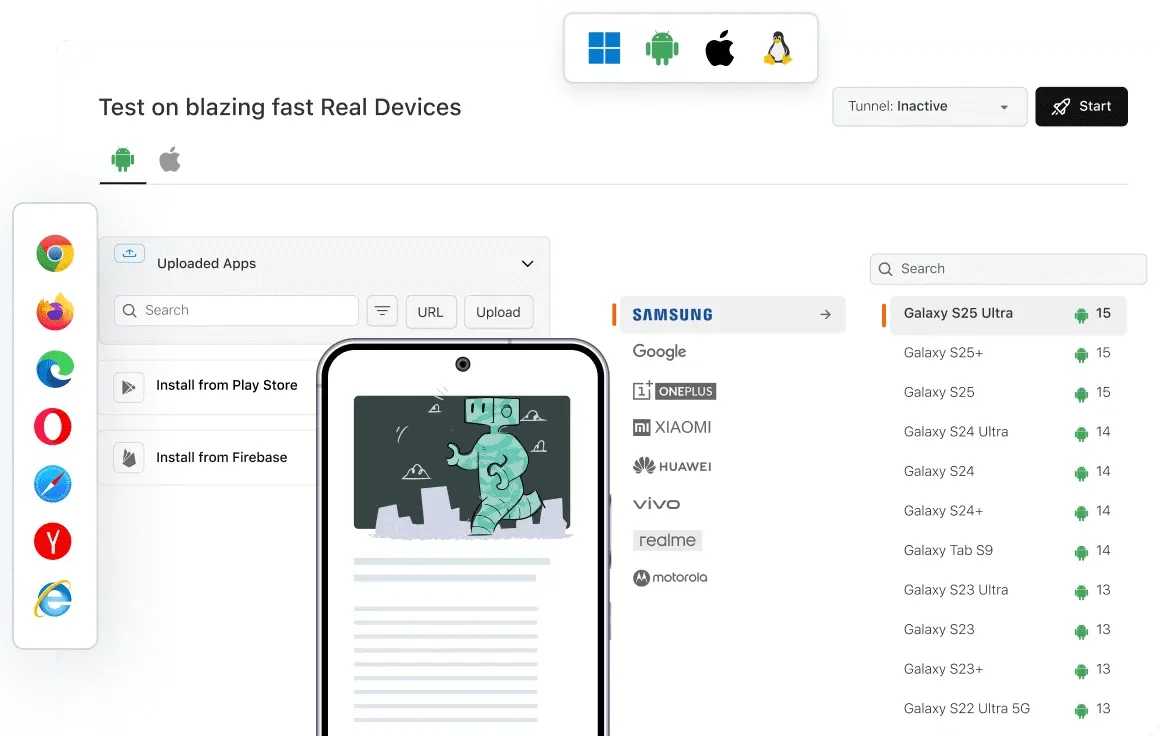
The new positioning is “the World’s First Agentic Quality Engineering Platform for Fully Autonomous Testing” - marketing language, but grounded in a real commercial shift. TestMu AI states that half of its revenue now comes from AI products such as Kane AI, which is the actual reason a browser-grid company renamed itself. Companies do not change a decade-old brand for cosmetic reasons; they do it when the thing they sell has changed underneath the name.
We place TestMu AI at #1 in Testing & QA. It has the broadest capability in this category by a wide margin, and, as the pricing section below demonstrates, the least predictable cost structure. Both facts belong in the same verdict, because the second is the price of the first.
The Rebrand: What Actually Changed
Date: 12 January 2026.
Unchanged: headquarters, team, legal entity, underlying product. No migration, no credential changes, no integration updates required.
Changed: the name, the positioning, and the emphasis of the roadmap.
The company figures
TestMu AI reports average 110 per cent year-on-year growth over the last two years, more than 18,000 enterprise customers across 90-plus countries, and names Microsoft, OpenAI, NVIDIA and Vimeo among them.
Those are figures published by TestMu AI in its own announcement, and we reproduce them with that attribution rather than as independently verified numbers. Customer logos in particular should be read carefully in any vendor announcement - a named customer may be running a single team on a small contract, and the disclosure rarely distinguishes.
What a rebrand does and does not tell you
A rebrand is a strategic signal, not a product improvement. Nothing about the new name makes a test run faster, catch more regressions or cost less.
What it does tell you is where investment is going. If you are evaluating the platform primarily for its cross-browser grid - the capability that made LambdaTest’s reputation - it is worth knowing that the grid is no longer the centre of the company’s attention or its revenue. That is not a reason to avoid it; the grid remains one of the largest in the industry. But roadmap attention tends to follow revenue, and the revenue has moved.
Conversely, if you are evaluating it for agentic testing, the rebrand indicates that KaneAI is a strategic bet rather than a side experiment, which matters for a capability you would be building a test suite around.
KaneAI: The Agentic Layer
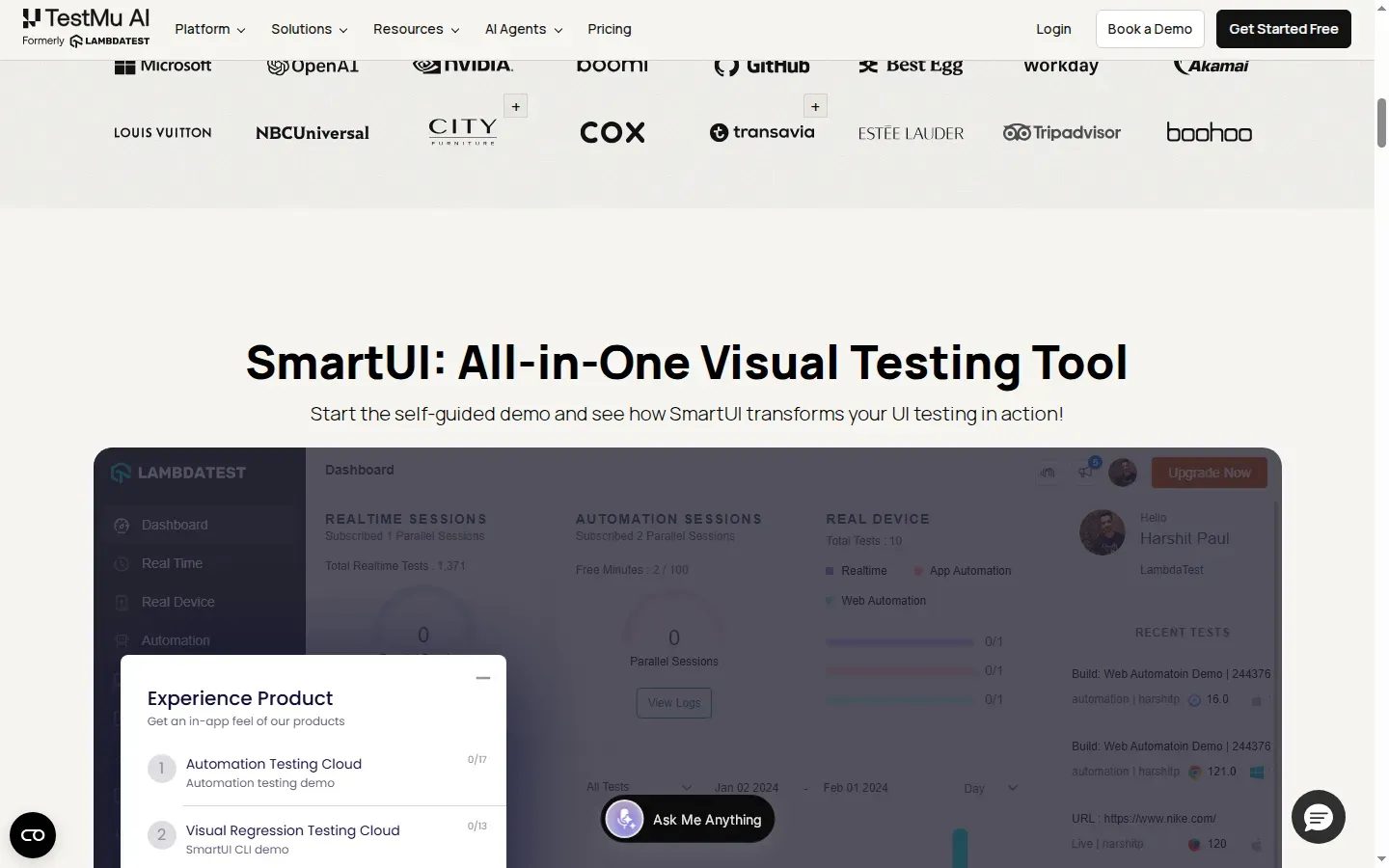
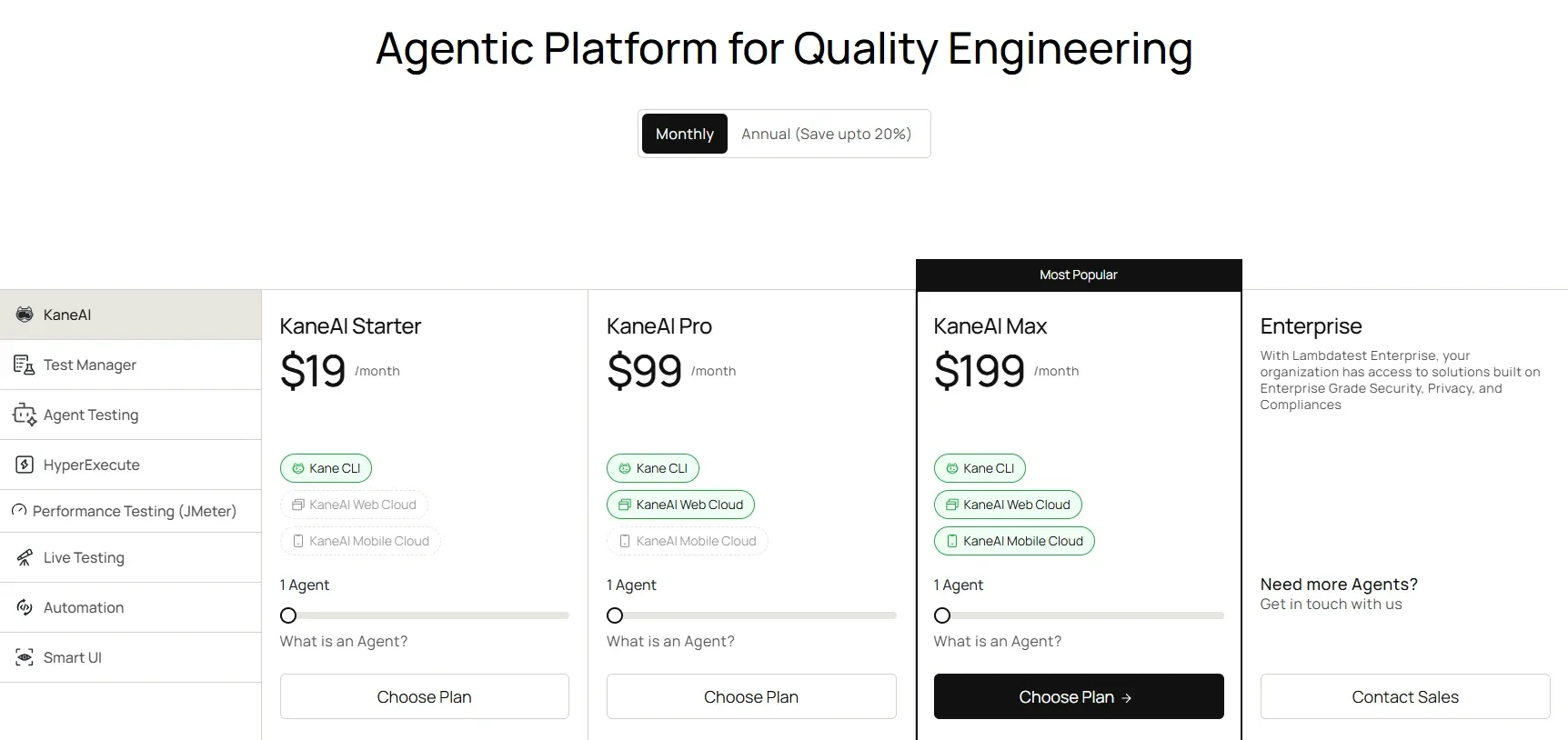
KaneAI is the product the rebrand is built around. It is billed per agent per month, with a credit allowance that determines how many tests you can author and run.
| Plan | Monthly | Annual | Credits | Tests (around 40 steps) |
|---|---|---|---|---|
| Starter | $19 | $17 | 2,000 | around 25 |
| Pro | $99 | $89 | 12,000 | around 150 |
| Max | $199 | $179 | 25,000 | around 313 |
| Enterprise | Custom | Custom | Unlimited | Unlimited |
Every plan includes one Test Manager seat and local authoring through the Kane CLI. Pro adds Cloud KaneAI Web and 100 HyperExecute minutes per month. Max adds Cloud KaneAI for Web and Mobile plus 300 HyperExecute minutes. Enterprise adds single sign-on and a dedicated proxy.
Cost per test
Credits are abstract; cost per test is not. The following is our own arithmetic from the published credit allowances:
| Plan | Monthly | Tests | Cost per test |
|---|---|---|---|
| Starter | $19 | around 25 | around $0.76 |
| Pro | $99 | around 150 | around $0.66 |
| Max | $199 | around 313 | around $0.64 |
The curve flattens quickly. Unlike many credit systems, KaneAI does not offer a dramatic volume discount - moving from Starter to Max cuts the per-test cost by roughly 16 per cent, not by half.
That has a clear implication for how you should think about upgrading. You do not move up a KaneAI tier to save money per test; you move up to unlock capability. If your volume grows but your requirements do not, adding agents at the tier you are already on is economically equivalent to upgrading.
The web and mobile boundary
That capability difference is concentrated in one place, and it is the most consequential line in the KaneAI table: Cloud KaneAI on Pro covers Web only. Mobile requires Max at $199.
If mobile testing is in scope, the entry price for agentic authoring is effectively $199 per agent per month, not $19. Teams evaluating on the headline figure and discovering the mobile boundary later is the single most likely budgeting surprise in this product.
The Kane CLI
Local authoring through the Kane CLI is available on every plan including Starter, which is a better arrangement than it first appears. It means the entry tier is not a crippled preview - you can author locally at $19 and only pay for cloud execution when you need it. For a team evaluating agentic testing before committing, that is the lowest-risk path in.
Decoding the Pricing: Four Different Units
This is where TestMu AI becomes genuinely difficult to budget for, and where this review can be most useful.
The platform bills seven product lines across four different units:
| Billing unit | Products |
|---|---|
| Per agent | KaneAI |
| Per parallel session | Live Testing, Automation, HyperExecute |
| Per user | Test Manager |
| Per virtual user hour | Performance Testing and JMeter |
Most platforms bill one way. Four simultaneous units means four separate forecasts, and it means an apparently small configuration change in one product can move the bill without touching the others.
The full price list
Test Manager. Free: unlimited projects and test runs. Premium: $59 per month ($49 annually), including 2,000 AI credits per user per month.
Live Testing (per parallel session per month, billed annually). Free: sessions limited to two minutes. Virtual Live $15, ChromeOS Live $29, Real Device Plus Live $39.
Automation (per parallel session per month, billed annually). Free: 100 lifetime minutes, 2 parallels. Desktop Web $79 ($99 monthly), Virtual Cloud $139, Real Device Plus $199.
HyperExecute (per parallel session per month, billed annually). Free: 300 minutes, 2 sessions. Cloud Linux $103 (unlimited minutes), Cloud MultiOS $159 (unlimited minutes).
Performance Testing and JMeter. Free: 100 virtual user hours per month, 100 concurrent users. Basic $79 per month (2,000 virtual user hours), Pro $349 per month (8,000 virtual user hours).
Agent Testing is custom quoted. Smart UI offers 2,000 screenshots free with paid tiers by volume.
Three realistic cost scenarios
These are our own calculations, built by combining the published prices above:
| Scenario | Configuration | Monthly cost |
|---|---|---|
| Three-person team, automated web testing only | 1 KaneAI Starter ($19) plus Automation Desktop Web at 2 parallels ($79 x 2) | around $177 |
| Startup needing real devices | 1 KaneAI Max ($199) plus Real Device Plus Live at 1 parallel ($39) | around $238 |
| Enterprise running heavy parallelism | KaneAI Pro x 3 ($99 x 3) plus HyperExecute Cloud MultiOS x 4 ($159 x 4) | around $933 |
The lesson is that the KaneAI headline price of $19 describes a small fraction of a realistic bill. Parallel sessions are the dominant cost driver, and they are the number most easily underestimated during evaluation - because during a trial you run one test at a time, and in production you run many.
How to size parallel sessions
Since parallelism drives the bill, it is worth sizing deliberately rather than guessing. Our own rule of thumb: divide your total suite runtime by the maximum acceptable wall-clock duration.
A suite that takes 200 minutes serially and must finish within 20 minutes needs roughly 10 parallel sessions. At Automation Desktop Web pricing that is around $790 per month for that product line alone - a number worth discovering during planning rather than on the first invoice.
The corollary is that reducing suite runtime is worth real money here. Every minute cut from the serial total reduces the parallelism required, and parallelism is the meter.
The annual versus monthly trap
Most headline prices assume annual billing. Automation Desktop Web is $79 annually but $99 monthly - a 25 per cent premium for flexibility.
Check the billing toggle on every line item before building a budget, because the pricing page mixes the two and the difference compounds across seven product lines.
What You Get Free
The free tiers here are unusually broad, and worth mapping before you pay for anything:
- Test Manager Free: unlimited projects and unlimited test runs. This is the standout - genuinely useful rather than a trial, and enough to run test management for a small team indefinitely.
- Automation Free: 100 minutes. Read that carefully - it is 100 lifetime minutes, not per month. It is an evaluation allowance that runs out once and does not refresh.
- HyperExecute Free: 300 minutes, 2 sessions.
- Performance Free: 100 virtual user hours per month, 100 concurrent users.
- Smart UI Free: 2,000 screenshots.
- Live Testing Free: sessions capped at two minutes.
The asymmetry is deliberate and worth noting: management and visual testing have generous ongoing free tiers, while execution minutes are strictly limited. TestMu AI gives away the parts that create habit and charges for the parts that consume infrastructure - a rational design, but one that means a free-tier evaluation will not tell you much about execution cost.
Real Device Cloud
The device cloud spans more than 10,000 real Android and iOS devices - the largest fleet among the tools in this category.
The premium for real hardware over virtual environments is substantial and consistent:
| Product | Virtual | Real device |
|---|---|---|
| Live Testing | $15 | $39 |
| Automation | $79 | $199 |
That is roughly 2.5 times on both lines. Whether it is worth paying depends entirely on what you are testing.
Virtual environments are sufficient for layout regressions, functional flows, form behaviour, navigation and the overwhelming majority of what a web test suite checks. If your application is a responsive web app, virtual browsers catch nearly everything.
Real devices are necessary for anything touching device-specific behaviour: camera and photo library access, biometric authentication, push notifications, real network conditions and transitions, GPU-accelerated rendering differences, and manufacturer skins on Android that alter system behaviour in ways emulators do not reproduce.
The failure mode of choosing wrongly is asymmetric. Testing on virtual environments when you needed real devices produces false confidence - a green suite and a broken app. Testing on real devices when virtual would have done merely costs more. Given that asymmetry, teams shipping mobile applications should treat the premium as insurance rather than an upgrade.
Who Should Use TestMu AI, and Who Should Not
Strong fit: organisations needing both a traditional cross-browser grid and AI agent authoring in one contract; teams testing on real mobile hardware at scale; enterprises running several distinct test types - web, mobile, performance, visual - that benefit from consolidation onto one vendor; existing LambdaTest customers, for whom nothing changed and the AI capability is additive.
Poor fit: small teams that need one simple, predictable price, where TestDriver.ai at $20 per user is dramatically easier to budget; teams needing only one kind of testing, who will pay for platform breadth they never touch; organisations without a dedicated quality engineering owner to size and optimise parallel-session configuration, since that is where the money goes.
Head-to-Head Comparisons
- TestMu AI vs TestDriver.ai: two opposite answers to agentic testing. TestMu AI gives breadth - grid, devices, performance, visual - at the cost of pricing complexity. TestDriver.ai gives one vision agent at $20 per user with a ten-hour monthly allowance. If you can articulate your testing needs in one sentence, TestDriver is likely cheaper and simpler; if your needs fill a page, consolidation wins.
- TestMu AI vs BugHerd: complementary rather than competing. TestMu AI automates verification; BugHerd collects human feedback from clients on live pages. Neither substitutes for the other.
- TestMu AI vs CodeRabbit: CodeRabbit reviews the code in a pull request; TestMu AI verifies the running application built from it. Both belong in the same pipeline at different stages.
- TestMu AI vs BrowserStack: the historical head-to-head in cross-browser testing, now complicated by the agentic layer. Any comparison written before January 2026 predates both the rebrand and the current KaneAI pricing.
The rebrand date, pricing across all seven product lines, and free-tier allowances in this review were verified against TestMu AI’s official pricing page, its rebrand announcement and the accompanying press release on 20 August 2026. Growth and customer-count figures are published by TestMu AI and are labelled as such. Cost-per-test figures, scenario totals and the parallelism sizing rule are our own arithmetic from published prices. Several widely circulated explainers about this rebrand are published by direct competitors. Confirm current terms at testmuai.com.
Evaluation Metrics
Accuracy in parsing call graphs, types, and catching subtle edge cases without noise.
Average execution time under 45s across PR triggers on GitHub Actions & GitLab CI.
Detection rate of OWASP Top 10 flaws, SQL injection risks, and leaked API secrets.
Time saved per senior reviewer and ease of interactive inline PR code chat.
Pros & Cons
What We Like (Pros)
- KaneAI agent authoring plus a traditional cross-browser grid in one platform
- Real device cloud spans more than 10,000 Android and iOS devices
- Test Manager free tier allows unlimited projects and test runs
- Existing LambdaTest customers needed no migration, credential change or integration update
Considerations (Cons)
- Seven product lines billed across four different units make costs hard to forecast
- Most headline prices assume annual billing, with monthly noticeably higher
- The Automation free tier is 100 minutes for the lifetime of the account, not per month
- Mobile KaneAI coverage requires the $199 Max tier
TestMu AI vs the Closest Alternatives
Alternatives named in this review, not tools that merely share a category.
| Feature Matrix |  TestMu AI Reviewed Tool |  TestDriver.ai | BrowserStack Not reviewed here |
|---|---|---|---|
| Rating Score | 4.9 / 5.0 | 4.8 / 5.0 | Not rated by us |
| Pricing Model | KaneAI from $19/agent/mo • Live from $15 • Automation from $79 | Pro $20/user/mo (10 test hours) • Business from $600/mo | Live from $29/mo - Automate from $59/mo (billed annually) |
| Best For | Organisations needing both a traditional cross-browser grid and AI agent authoring in one contract; teams testing on real mobile hardware at scale. | Teams shipping native desktop applications or browser extensions, where alternatives are scarce and setup costs are high; anyone testing third-party software without source access. | Teams whose requirement is the browser grid alone |
| Key Differentiator | Cross-browser grid, real device cloud and agentic authoring in one contract | Vision-based agent that tests desktop apps and extensions with no selectors | The historical head-to-head in cross-browser testing, without the agentic layer |
| Action / Review | Try Free | Read Review |
Frequently Asked Questions
Does TestMu AI train AI models on private repository code?
No. TestMu AI strictly adheres to zero-data-retention standards. Code diffs and repository context are processed in ephemeral memory for the duration of the review execution and are never stored or used to train public models.
How do I configure custom coding standards and linters?
TestMu AI reads a repository configuration file placed in the root directory. You can define rule severity, exclude specific paths, set language guidelines, and prompt instructions matching your team's style guide.
Is TestMu AI free for open-source software projects?
Public open-source repositories hosted on GitHub and GitLab receive free automated reviews with no cap on the number of repositories, pull requests, or contributors.
Which languages and frameworks does TestMu AI support?
TestMu AI covers the mainstream ecosystem - TypeScript/JavaScript, Python, Go, Java, Ruby, PHP, Rust, and C# - along with infrastructure-as-code formats such as Terraform, Dockerfiles, and Kubernetes manifests.
How does TestMu AI handle security scanning?
TestMu AI scans every incoming commit for hardcoded API keys, database credentials, SQL injection risks, and OWASP Top 10 security vulnerabilities before code is merged into production. High-priority security alerts are flagged directly inline within the pull request.


