

The Bottom Line
Tella is ranked #2 in our Learning & Content Creation category. Record, edit and publish branded video on any platform, with viewer analytics. We rate it 4.9/5.
Best for
Mixed-platform teams, since Windows is fully supported with a native application rather than a browser fallback; anyone publishing video under their own brand and domain.
Considerations
Users who want the absolute best-looking demo output with the least effort, where Screen Studio still leads; anyone needing a single continuous recording longer than six hours.
Executive Summary & Independent Verdict
Tella occupies the space between a screen recorder and a video platform. It records, it edits, and - the part that actually distinguishes it - it publishes. Videos get a shareable link instantly, can be embedded anywhere, can live on your own domain, and report back on who watched and where they stopped.
That publishing layer is why Tella and Screen Studio are not really the same product despite being direct competitors. Screen Studio produces a file. Tella produces a destination, with everything that implies about branding, access control and measurement.
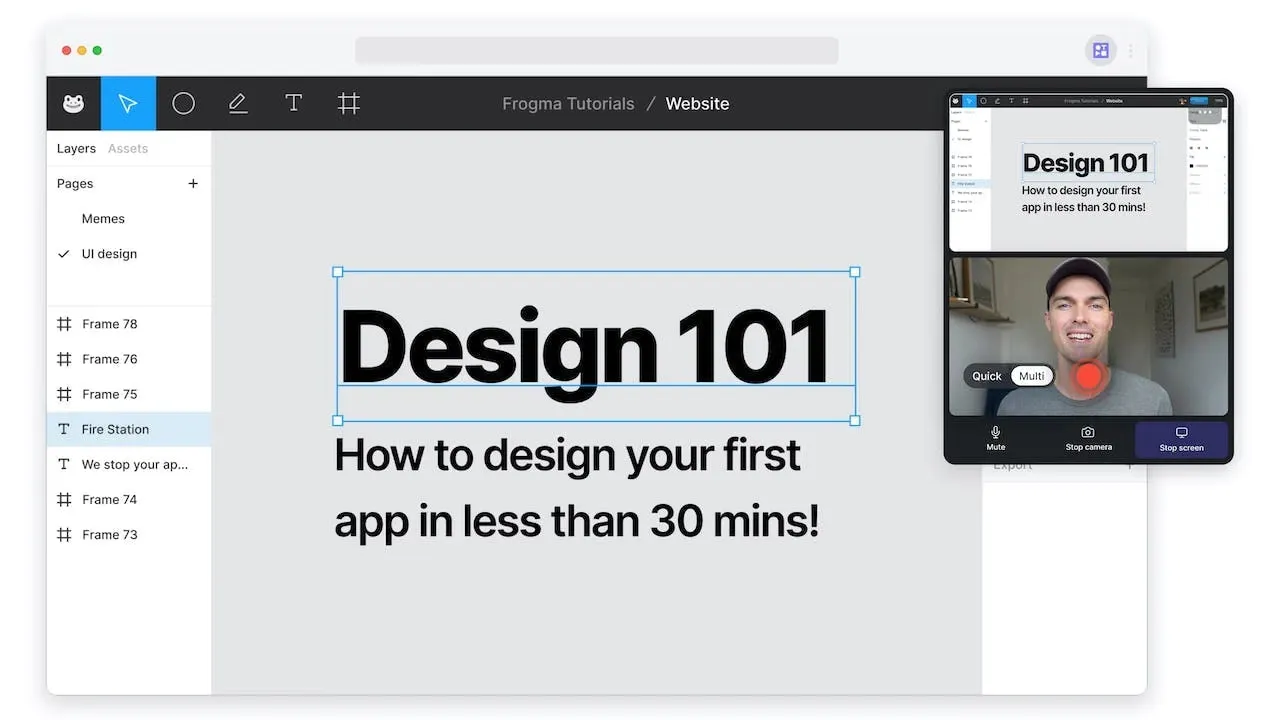
It is also the cross-platform answer in this category. Tella ships a native macOS recorder, a native Windows recorder, a web app and a Chrome extension - which for mixed-platform teams settles the question before features are even compared.
We place Tella at #2 in Learning & Content Creation, immediately behind Screen Studio. The gap is narrow and the axis is clear: Screen Studio wins on how the finished video looks; Tella wins on everything that happens after it is finished.
Recording and Editing
Recording modes and layouts
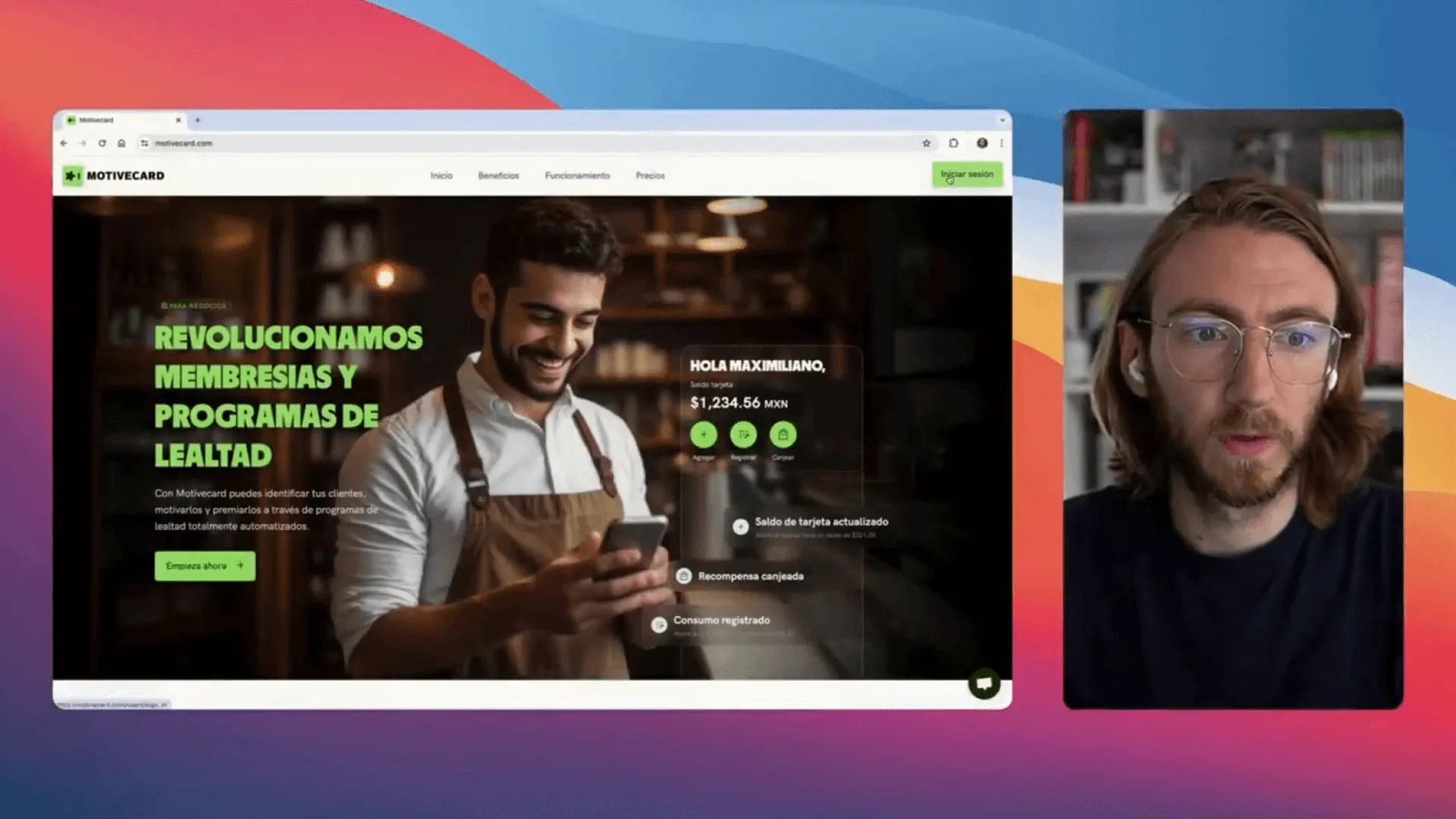
Record screen and camera, screen only, or camera only. The editor offers dynamic layouts - “Switch between layouts on the fly. Side-by-side, picture-in-picture, full screen and more” - plus Auto Layouts that select arrangements automatically for screen-and-camera combinations.
Switching layout mid-video is the feature that makes a single take feel produced. Talk to camera for the introduction, cut to full screen for the demonstration, return to picture-in-picture for the conclusion - all from one recording, without a separate editing session and without the multi-camera setup that would otherwise be required.
For anyone who has tried to achieve the same result by recording three separate clips and stitching them, the time saving is substantial and the result is more coherent because it is genuinely one take.
Text-based editing
This is Tella’s most distinctive capability: “Edit your video just like a document.”
The insight behind it is that most video editing for talking-head content is really transcript editing. You are not adjusting frames; you are removing the sentence you got wrong and the eight seconds where you lost your thread. Doing that in a transcript is faster than doing it on a timeline because it matches how you think about the content.
Around it sits a set of automated cleanups that matter more than they sound:
- Automatic mistake detection - “Find and cut mistakes in your clip”
- Silence removal
- Filler word elimination - in Tella’s own phrasing, “you can um and ah all you like, no one will ever know”
For anyone who records unscripted, this is the difference between a usable first take and a fourth attempt. The pauses and verbal tics that make raw recordings painful are removed without scrubbing through a timeline hunting for them.
A built-in teleprompter covers the opposite working style, for people who would rather read a script than clean one up afterwards. Having both is sensible: the two approaches suit different people and different content, and forcing one is a common failing in this category.
Audio and visual polish
Audio enhancement provides “studio-quality sound in one click”, removing background noise and normalising levels, and the recorder captures high quality system audio - which matters for demos where the application’s own sounds are part of what you are showing.
Visually, Tella adds automatic zoom effects that “highlight clicks”, the same idea Screen Studio built its reputation on, plus the ability to blur sensitive information such as passwords and email addresses.
That last feature deserves more attention than it usually gets. Demos recorded against a real account rather than a sanitised test environment are faster to produce and more convincing to watch, and the only thing preventing most teams from doing it is the risk of exposing something. Selective blurring removes that constraint.
The Six-Hour Clip Limit
One constraint applies identically across every plan, including Enterprise: a single clip is capped at six hours.
Because it does not change with price, this is a technical limit rather than an upsell lever - which is worth knowing, because no amount of budget removes it and there is no point negotiating. The documented workaround is to combine multiple clips for longer content.
For product demos, tutorials, async updates and the overwhelming majority of business video, six hours is not a constraint anyone will approach. For recording a full-day workshop or a long conference track as a single continuous file, it is, and the answer is to record in segments and combine - which is generally better practice anyway, since a six-hour single file is difficult to navigate for viewers regardless of the platform hosting it.
What $19 Premium Actually Buys
The gap between Pro at $13 and Premium at $19 is not about video quality in any meaningful sense. It is about control over distribution - and understanding that prevents both overspending and under-buying.
Custom domain. Videos published under your own domain rather than Tella’s. For customer-facing content, sales collateral or anything representing the company externally, this is usually the deciding feature. A video hosted on a vendor’s domain looks like a video hosted on a vendor’s domain, and for enterprise sales material that matters.
Domain restriction. Control who can view. Essential for internal content - onboarding material, recorded all-hands meetings, anything that should stay inside the organisation. Without it, an unlisted link is your only protection, and unlisted links get forwarded.
Remove branding. The obvious one, and rarely the actual reason people upgrade.
Advanced analytics. Beyond view counts into engagement detail, covered in the next section.
4K at 60 FPS. Pro exports up to 4K; Premium adds 60 FPS. This matters for footage with rapid motion - game capture, animation, fast scrolling, anything with continuous movement - and is entirely invisible on a talking-head explainer. Do not upgrade for this unless you know you need it.
The summary: upgrading to Premium buys distribution control, not production quality. If your videos are internal drafts or quick async messages, Pro is correct. If they are published assets carrying your brand, Premium is not optional.
Analytics That Actually Say Something
Tella tracks views and “how many people watch your videos, where they come from, and when they watch” - and, more usefully, engagement showing “exactly where viewers drop off, rewatch, or skip ahead.”
Those three signals answer different questions, and together they form a genuine feedback loop:
- Drop-off shows where the video loses people. If sixty per cent leave at ninety seconds, the first ninety seconds are the problem - usually because the video has not yet said why the viewer should care.
- Rewatch shows where something was unclear enough to need a second pass, or important enough to revisit. Either interpretation marks a section worth rewriting, and the two are usually distinguishable from context.
- Skip ahead shows where viewers already knew the material, indicating content that could be cut to make the video shorter and better.
For a team producing onboarding or sales video at any volume, that loop is the argument for using a platform rather than exporting files and posting them somewhere. Without it, video is a thing you make and hope about; with it, video is a thing you iterate on like any other asset.
Team and Enterprise
Team collaboration is available from Pro: add teammates as editors or viewers, control access per video, and organise content into playlists by team, project or topic. Tella also supports 106 languages.
Playlists are worth noting for organisations building a library rather than producing one-off videos. An onboarding sequence, a product training path or a customer education series works considerably better as an ordered collection than as a folder of links.
Enterprise adds single sign-on and SCIM, a shared Slack channel, personalised onboarding and volume discounts. As is common across this category, identity infrastructure is the Enterprise trigger - if your security policy mandates single sign-on, the published prices do not apply to you.
Pricing Analysis
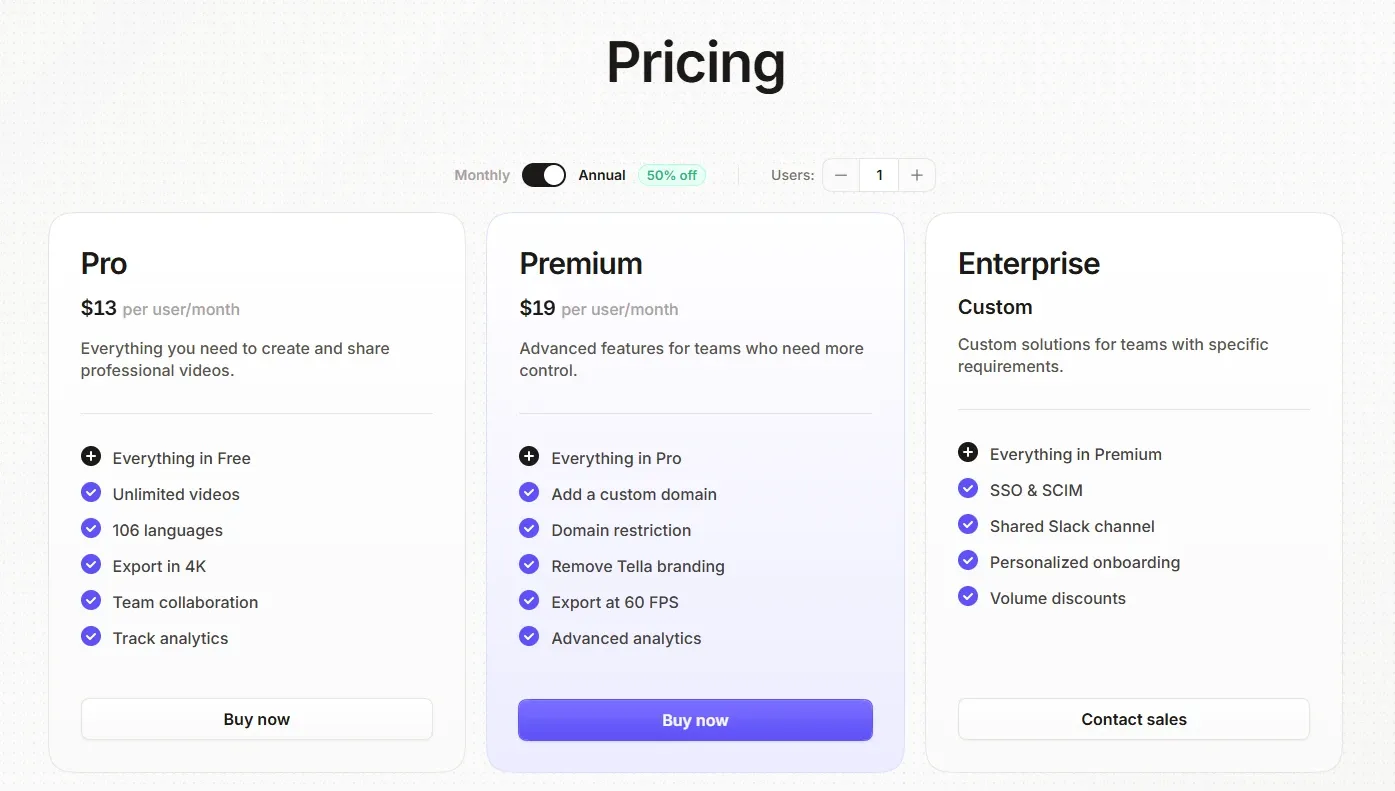
| Plan | Monthly | Annual | Clip length | Export quality |
|---|---|---|---|---|
| Pro | $13/month | “50% off” | 6 hours per clip | Up to 4K |
| Premium | $19/month | “50% off” | 6 hours per clip | 4K and 60 FPS |
| Enterprise | Custom | Custom | 6 hours per clip | 4K and 60 FPS |
The annual discount is unusually large
The pricing page advertises 50 per cent off annual billing. Most tools in this category offer 20 to 25 per cent, and several - including Fillout - offer nothing at all.
Our own arithmetic, if that 50 per cent applies to the monthly rate: Pro would land near $6.50 per month and Premium near $9.50 per month on annual billing.
That second figure is worth pausing on. It would put Premium at roughly the same effective price as Screen Studio’s $9 annual rate, while adding cross-platform support, publishing, custom domains and analytics - which changes the competitive picture between the two products considerably.
Note: the pricing page displays the discount as a toggle without showing the resulting figures at the time of verification. Confirm the actual annual prices before budgeting - the calculation above is inference from the advertised discount, not a quoted number, and the comparison it enables depends entirely on that inference being correct.
Who Should Use Tella, and Who Should Not
Strong fit: mixed-platform teams, since Windows is fully supported with a native application rather than a browser fallback; anyone publishing video under their own brand and domain; teams that need viewer analytics to improve content rather than just count views; people who record unscripted and want filler words and silences removed automatically; organisations building a shared, access-controlled video library.
Poor fit: users who want the absolute best-looking demo output with the least effort, where Screen Studio still leads; anyone needing a single continuous recording longer than six hours; teams that only ever send quick async messages, where a lighter and cheaper tool is sufficient; organisations requiring single sign-on without an Enterprise agreement.
Head-to-Head Comparisons
- Tella vs Screen Studio: the defining comparison in this category. Screen Studio is macOS-only and optimises the finished file; Tella runs everywhere and optimises what happens after publishing. If you are on Windows, the decision is made for you. If you are on Mac and only need files, Screen Studio is the tighter product. Full breakdown in Screen Studio vs Tella.
- Tella vs Loom: closest in workflow, and the most common switch. Loom is optimised for speed of capture and send; Tella adds real editing, branded publishing and deeper analytics. Teams usually move from Loom to Tella when video stops being internal messaging and starts being a published asset.
- Tella vs Wispr Flow: different media entirely. Wispr Flow turns speech into text and meeting notes; Tella turns it into video. Both address the same underlying preference for talking over typing.
Feature descriptions, plan tiers, clip limits and export quality in this review were verified against Tella’s official site and pricing page on 18 August 2026. Note that tella.tv now redirects to tella.com. Effective annual prices are inferred from the advertised 50 per cent discount and are labelled as such rather than quoted. Confirm current terms at tella.com before purchasing.
Evaluation Metrics
Accuracy in parsing call graphs, types, and catching subtle edge cases without noise.
Average execution time under 45s across PR triggers on GitHub Actions & GitLab CI.
Detection rate of OWASP Top 10 flaws, SQL injection risks, and leaked API secrets.
Time saved per senior reviewer and ease of interactive inline PR code chat.
Pros & Cons
What We Like (Pros)
- Native macOS and Windows recorders plus a web app and Chrome extension
- Text-based editing removes filler words and silences like editing a document
- Premium publishes video on your own custom domain with viewer domain restrictions
- Analytics show exactly where viewers drop off, rewatch or skip ahead
Considerations (Cons)
- Every plan, including Enterprise, caps a single clip at six hours
- Removing Tella branding requires the $19 Premium plan
- 60 FPS export is gated behind Premium
- SSO and SCIM are Enterprise-only
Tella vs the Closest Alternatives
Alternatives named in this review, not tools that merely share a category.
| Feature Matrix |  Tella Reviewed Tool |  Screen Studio | Loom Not reviewed here |
|---|---|---|---|
| Rating Score | 4.9 / 5.0 | 4.9 / 5.0 | Not rated by us |
| Pricing Model | Pro $13/mo • Premium $19/mo • Enterprise custom (50% off annually) | $9/mo billed yearly ($108/yr) • $29/mo billed monthly | Free - Business $18/user/mo - Business + AI $24/user/mo |
| Best For | Mixed-platform teams, since Windows is fully supported with a native application rather than a browser fallback; anyone publishing video under their own brand and domain. | Product demos, onboarding videos and marketing footage on macOS; founders and product marketers with no video editing skills and no appetite for acquiring them. | Internal async messaging where finish quality does not matter |
| Key Differentiator | Cross-platform recording with custom domain, branding and viewer analytics | Automatic cursor-following zoom and motion smoothing, with no editing step | Optimised for speed of capture and sharing an everyday message |
| Action / Review | Try Free | Read Review |
Full breakdown: Tella vs Screen Studio.
Frequently Asked Questions
Does Tella train AI models on private repository code?
No. Tella strictly adheres to zero-data-retention standards. Code diffs and repository context are processed in ephemeral memory for the duration of the review execution and are never stored or used to train public models.
How do I configure custom coding standards and linters?
Tella reads a repository configuration file placed in the root directory. You can define rule severity, exclude specific paths, set language guidelines, and prompt instructions matching your team's style guide.
Is Tella free for open-source software projects?
Public open-source repositories hosted on GitHub and GitLab receive free automated reviews with no cap on the number of repositories, pull requests, or contributors.
Which languages and frameworks does Tella support?
Tella covers the mainstream ecosystem - TypeScript/JavaScript, Python, Go, Java, Ruby, PHP, Rust, and C# - along with infrastructure-as-code formats such as Terraform, Dockerfiles, and Kubernetes manifests.
How does Tella handle security scanning?
Tella scans every incoming commit for hardcoded API keys, database credentials, SQL injection risks, and OWASP Top 10 security vulnerabilities before code is merged into production. High-priority security alerts are flagged directly inline within the pull request.


