

The Bottom Line
Superwhisper is ranked #5 in our Learning & Content Creation category. Offline-capable AI dictation with local models and a lifetime licence option. We rate it 4.8/5.
Best for
Professionals in law, healthcare, finance or journalism where audio must not leave the device; people who work without reliable connectivity or inside restricted networks.
Considerations
Android users, where there is no client at all; Intel Mac owners whose primary requirement is offline processing, given the vendor's own guidance about cloud models.
Executive Summary & Independent Verdict
Superwhisper is built for people who treat their own voice as sensitive data. Its central claim is simple and unusual in an AI product: “Works offline, so you can transcribe anytime. No Wi-Fi, no problem.”
Transcription runs on local models on your machine. The audio does not travel to a server, which means there is no vendor retention policy to read, no data processing agreement to negotiate, and no question about what happens to the recording afterwards. For a lawyer dictating case notes or a clinician recording observations, that is not a feature preference - it is the difference between a usable tool and a compliance problem.
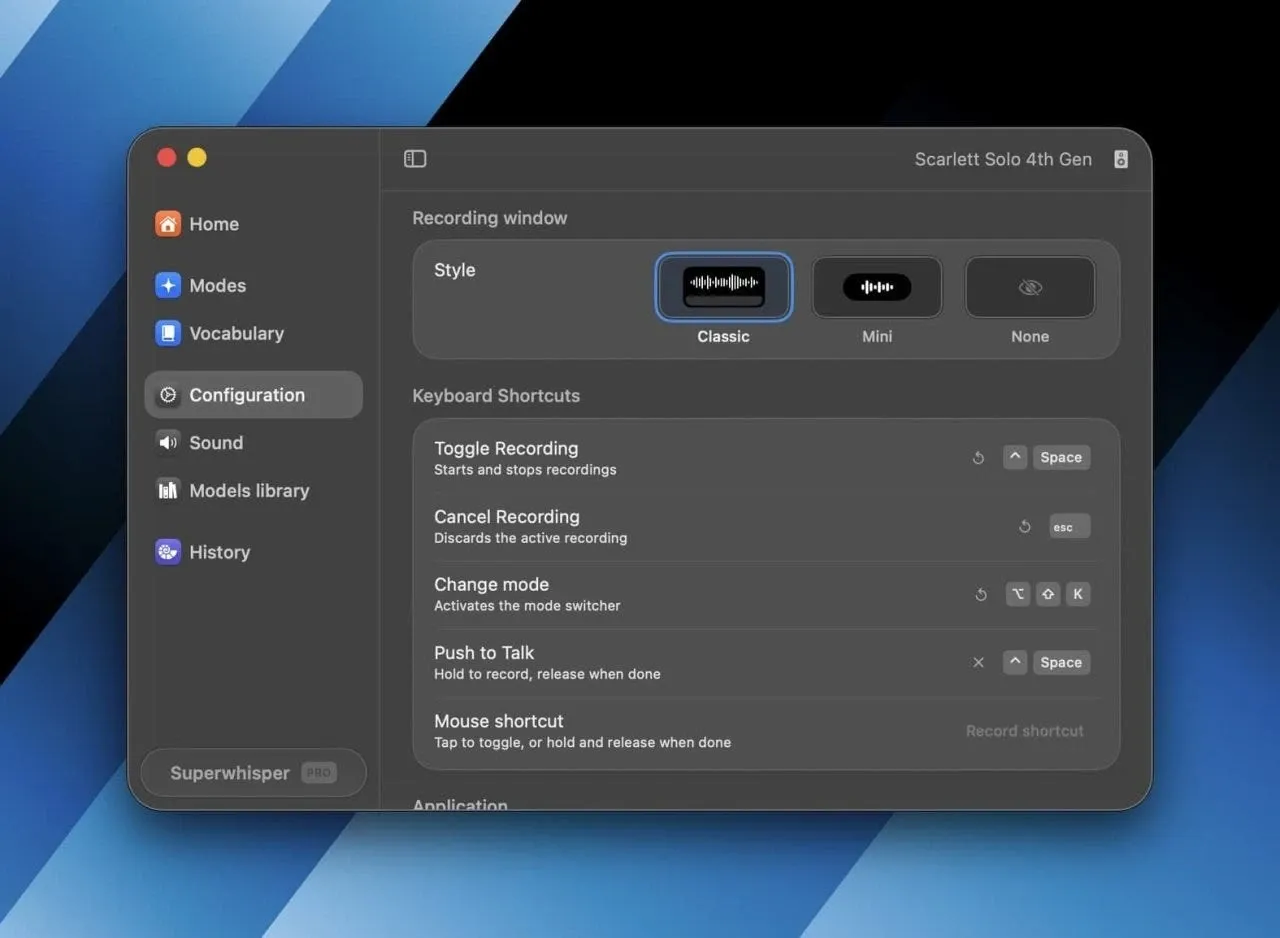
Two further choices reinforce the same philosophy. It still sells a one-time lifetime licence in a market that has otherwise moved entirely to subscriptions, and Pro lets you bring your own model API keys rather than being locked to whatever the vendor selected.
We place Superwhisper at #5 in Learning & Content Creation, behind Wispr Flow at #3. The reason is scope rather than quality. Wispr Flow covers Android, ships a meeting notetaker with speaker identification and offers a certified compliance path. Superwhisper is the better tool for a specific and entirely defensible set of requirements - it simply covers fewer of them.
Offline and Privacy: The Core Argument
What running locally actually means
Cloud dictation sends your audio to a server for processing. That is normally fine and occasionally not - and the cases where it is not tend to be exactly the cases where dictation would save the most time, because the most sensitive work is often the most verbose.
Superwhisper’s local models keep the audio on the machine. No upload, therefore no retention question. You are not trusting a policy that could change with an acquisition or a terms update; you are relying on the architecture, which cannot change retroactively.
This distinction matters more in 2026 than it did five years ago. Vendor data practices have become a procurement question rather than an afterthought, and “the data never left the device” is the only answer that requires no further verification.
Where this matters concretely
- Legal - privileged client conversations and case notes, where the privilege itself may be affected by third-party processing.
- Healthcare - clinical observations that are protected health information the moment they exist.
- Finance - material non-public information in meeting notes and deal commentary.
- Journalism - source protection, where cloud processing creates a record that could be subpoenaed and that you did not intend to create.
- Fieldwork and travel - aeroplanes, remote sites, restricted networks, secure facilities, anywhere a cloud service simply does not respond.
That last category is worth separating from the privacy argument. Offline capability is a reliability feature as much as a confidentiality one, and a dictation tool that stops working on a flight is a dictation tool you stop relying on.
The caveat the vendor states, and we repeat
Superwhisper’s own documentation notes that Intel Macs work best with cloud models.
This matters, and it is to the vendor’s credit that it is documented rather than buried. On Intel hardware the local-model path - the entire privacy argument - is the weaker option, because the machine lacks the neural processing capability that makes on-device inference practical.
If your machine is an Intel Mac and offline processing is why you are buying, test that configuration specifically before committing. Apple Silicon is where this product’s core promise is fully realised, and the gap is a hardware limitation rather than a software one, so it will not be fixed in an update.
Model Choice and Bring-Your-Own Keys
Superwhisper does not lock you to one provider. Users can select among GPT-5, Claude Haiku, Llama, Grok, Gemini and Mistral.
Pro supports using your own AI API keys. That has two consequences worth spelling out.
Cost control. Rather than paying a vendor’s margin on inference, you pay the provider directly at their rates. For heavy users this can be cheaper; for light users the subscription is simpler and the difference is not worth managing. Which applies depends on your volume, and the option to choose is itself the benefit.
Independence. If a provider changes pricing, deprecates a model or has an outage, you switch keys. You are not waiting for the application vendor to react, negotiate or ship an update - the dependency is yours to manage rather than yours to endure.
This is the same philosophy as the offline models, applied one layer up. The product consistently tries to keep you in control of the dependency rather than mediating it, which is a coherent design position and the clearest thing that distinguishes it from its competitors.
Daily Driver Features
Modes
Predefined modes optimise “tone, structure, and formatting” for context.
Dictating a Slack message and dictating a formal email are different tasks with different conventions, and a tool that formats both identically forces you to fix one of them by hand every time. Modes handle that at source, which is the difference between dictation that saves time and dictation that relocates the work to editing.
Custom vocabulary
“Enter names, abbreviations, and specialized terms once.”
This is the feature that decides whether a dictation tool survives contact with real work. Every profession has vocabulary a general model mangles - drug names, legal citations, internal product codenames, framework names, colleagues’ surnames. Correcting the same word for the hundredth time is what makes people abandon dictation, and it happens well before the novelty wears off.
Teaching it once fixes the problem permanently, and the cumulative time saved is larger than any raw accuracy improvement.
Input controls
Push to talk, a newer addition, plus configurable shortcuts and Super Mode for adaptive results.
Clipboard integration pastes automatically into whatever application is in front of you. That is what makes dictation feel like an input method rather than a separate application you visit - the difference between speaking into your editor and speaking into a transcription window and then copying the result.
Beyond live dictation
Superwhisper also records and transcribes meetings and transcribes existing audio and video files.
That second capability quietly extends its usefulness in a way the marketing underplays. An archive of recorded calls, lectures or interviews can be processed locally, in bulk, without uploading any of it - which for a research team, a journalist or a legal practice is a materially different proposition from a cloud service that would require sending the entire archive to a third party.
Languages
More than 100 languages and dialects, with translation.
Platforms
macOS (Intel and Apple Silicon), Windows and iOS.
There is no Android client and no Linux build. For Android users specifically, this is the clearest reason to look at Wispr Flow, whose free tier is unlimited on that platform - a straight reversal of the usual pattern, where the privacy-focused tool is the one with broader reach.
Pricing: The Rare Lifetime Option
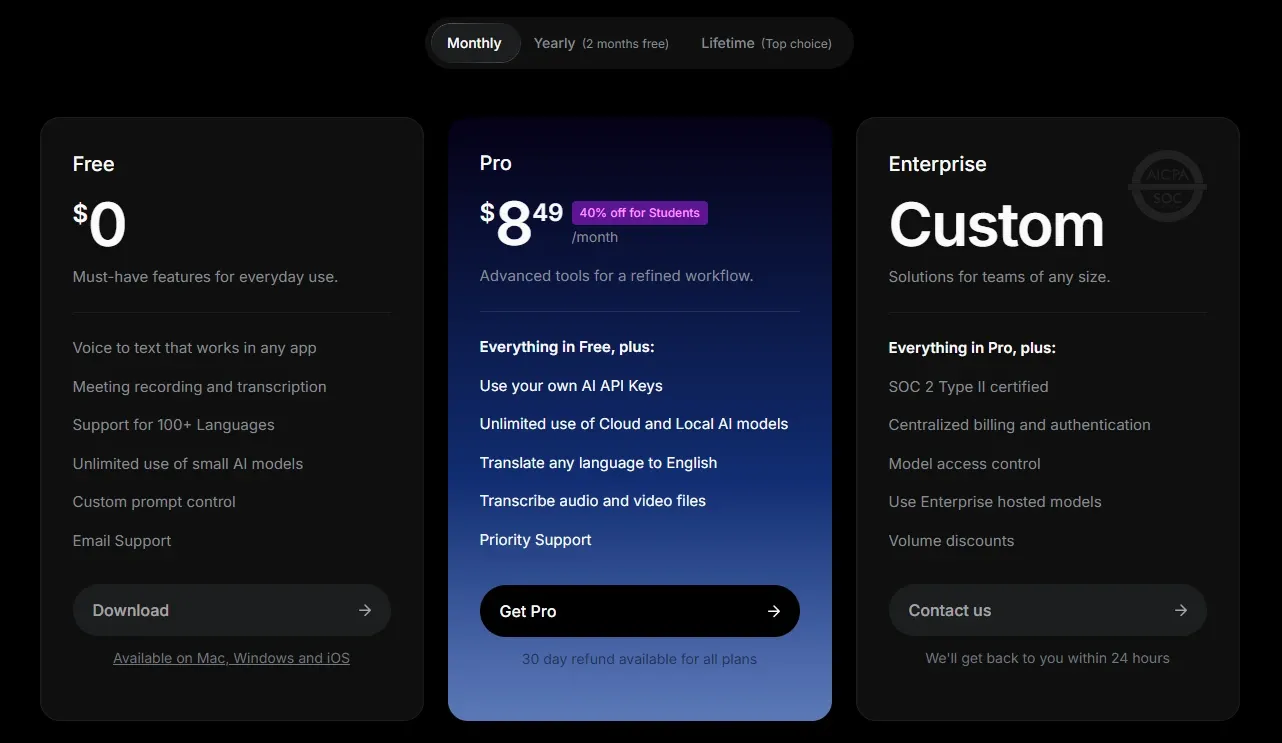
| Plan | Price | Notes |
|---|---|---|
| Free | $0 | Basic features plus a 15-minute Pro trial |
| Pro | $8.49/month | Annual billing includes two free months |
| Lifetime | One-time purchase, marketed as “Top choice” | Price not displayed on the homepage |
| Enterprise | Custom | SOC 2 Type II certified |
Annual billing
Two free months on annual billing works out to roughly $84.90 per year, against $101.88 paid monthly - a saving of about 17 per cent. (Our arithmetic, from the published monthly rate.)
The lifetime licence
Superwhisper markets Lifetime as its “Top choice”, and in a market that has almost entirely abandoned perpetual licensing, that is a genuine differentiator rather than a legacy holdover.
It is also philosophically consistent with the rest of the product. An offline tool with a one-time licence keeps working regardless of what happens to the company - no server to shut down, no subscription to lapse, no account to deactivate. For anyone who has lost access to software they depended on because a vendor was acquired or pivoted, that combination has real value beyond the price.
Note: we could not retrieve the Lifetime price from the site. Since it is the plan the vendor promotes most prominently, obtain the current figure before deciding. The break-even against $8.49 per month is the entire calculation, and we are not going to guess at a number that determines it.
The 15-minute trial
The Pro trial is 15 minutes, and it is the weakest part of the packaging.
Fifteen minutes is enough to confirm the application installs and produces text. It is not enough to evaluate what actually matters: whether local models handle your accent reliably, whether custom vocabulary learns your terminology, whether the modes suit how you write, and whether the whole thing survives a normal working day.
Those judgements take days of ordinary use, not one sitting. The free tier remains available afterwards, so evaluation is not impossible - but the Pro-specific features you are actually deciding about get a very narrow window, and a longer trial would serve both sides better.
Who Should Use Superwhisper, and Who Should Not
Strong fit: professionals in law, healthcare, finance or journalism where audio must not leave the device; people who work without reliable connectivity or inside restricted networks; anyone who prefers buying software once rather than renting it; users who want to supply their own model API keys for cost or independence reasons; people working across macOS, Windows and iOS who want consistent behaviour.
Poor fit: Android users, where there is no client at all; Intel Mac owners whose primary requirement is offline processing, given the vendor’s own guidance about cloud models; teams needing meeting notes attributed by speaker; organisations requiring certified compliance below the Enterprise tier.
Head-to-Head Comparisons
- Superwhisper vs Wispr Flow: the decision that defines this category. Superwhisper gives local models, offline operation, a lifetime licence and bring-your-own-keys at $8.49 per month. Wispr Flow gives Android support, a meeting notetaker with speaker identification, calendar and Slack integration and certified compliance at $15. Neither is universally better, and the full comparison table is in the Wispr Flow review.
- Superwhisper vs built-in dictation: macOS and Windows both include dictation. Superwhisper adds formatting modes, custom vocabulary, model choice and file transcription. If you dictate occasionally, the built-in option is adequate; if you dictate daily, the gap becomes obvious within a week.
- Superwhisper vs Screen Studio: unrelated in function but philosophically aligned. Screen Studio also processes transcription on-device rather than in the cloud - a shared and increasingly uncommon stance on where your data should live.
Product description, features, platform support, model options and the published Pro price in this review were verified against Superwhisper’s official site on 17 August 2026. The annual total and saving percentage are our own arithmetic from the monthly rate. The Lifetime price could not be retrieved and is deliberately not estimated. The guidance that Intel Macs work best with cloud models is Superwhisper’s own documentation. Confirm current terms at superwhisper.com.
Evaluation Metrics
Accuracy in parsing call graphs, types, and catching subtle edge cases without noise.
Average execution time under 45s across PR triggers on GitHub Actions & GitLab CI.
Detection rate of OWASP Top 10 flaws, SQL injection risks, and leaked API secrets.
Time saved per senior reviewer and ease of interactive inline PR code chat.
Pros & Cons
What We Like (Pros)
- Runs fully offline with local models, so audio never leaves the machine
- A one-time lifetime licence is offered alongside the subscription
- Pro supports bringing your own API keys across several model providers
- Custom vocabulary and formatting modes adapt output to specialised terminology
Considerations (Cons)
- Intel Macs are documented to work best with cloud models rather than local ones
- The Pro trial lasts only 15 minutes
- No Android or Linux client
- SOC 2 Type II certification is tied to the Enterprise tier
Superwhisper vs the Closest Alternatives
Alternatives named in this review, not tools that merely share a category.
| Feature Matrix |  Superwhisper Reviewed Tool |  Wispr Flow |
|---|---|---|
| Rating Score | 4.8 / 5.0 | 4.8 / 5.0 |
| Pricing Model | Free • Pro $8.49/mo • Lifetime one-time • Enterprise custom | Free (2,000 words/week) • Pro $12/user/mo annually • Enterprise custom |
| Best For | Professionals in law, healthcare, finance or journalism where audio must not leave the device; people who work without reliable connectivity or inside restricted networks. | Organisations in healthcare, finance or legal needing certified compliance and a signed BAA; Android users, who get an unlimited free tier that is genuinely complete. |
| Key Differentiator | Dictation that runs transcription models locally and fully offline | Dictation with speaker-attributed meeting notes across Mac, Windows and mobile |
| Action / Review | Try Free | Read Review |
Frequently Asked Questions
Does Superwhisper train AI models on private repository code?
No. Superwhisper strictly adheres to zero-data-retention standards. Code diffs and repository context are processed in ephemeral memory for the duration of the review execution and are never stored or used to train public models.
How do I configure custom coding standards and linters?
Superwhisper reads a repository configuration file placed in the root directory. You can define rule severity, exclude specific paths, set language guidelines, and prompt instructions matching your team's style guide.
Is Superwhisper free for open-source software projects?
Public open-source repositories hosted on GitHub and GitLab receive free automated reviews with no cap on the number of repositories, pull requests, or contributors.
Which languages and frameworks does Superwhisper support?
Superwhisper covers the mainstream ecosystem - TypeScript/JavaScript, Python, Go, Java, Ruby, PHP, Rust, and C# - along with infrastructure-as-code formats such as Terraform, Dockerfiles, and Kubernetes manifests.
How does Superwhisper handle security scanning?
Superwhisper scans every incoming commit for hardcoded API keys, database credentials, SQL injection risks, and OWASP Top 10 security vulnerabilities before code is merged into production. High-priority security alerts are flagged directly inline within the pull request.


