

The Bottom Line
Lovable is ranked #4 in our AI Coding & Development category. Prompt to full-stack web app, with Supabase auth and database wired in. We rate it 4.8/5.
Best for
Non-technical founders validating an idea; internal dashboards and tools that would otherwise sit in an IT backlog.
Considerations
Teams whose stack is not Supabase-shaped; applications with heavy multi-step business logic, where the AI needs the most correction and credits are consumed fastest.
Executive Summary & Independent Verdict
Lovable is the shortest distance between a written idea and a running full-stack web application. You describe what you want; it produces a React and TypeScript front end, provisions a database and authentication behind it, and deploys the result.
The generated code is genuinely reasonable - clean, structured, and readable enough to hand to an engineer later without an apology. That single property is what separates Lovable from tools that produce something impressive on screen and unmaintainable underneath, and it is the difference between a prototype that becomes a product and one that has to be rebuilt.
There is an important architectural boundary to understand before evaluating it: the backend is Supabase. That is a good default - it is a strong platform, and we rate it #2 in Hosting & Cloud - but it is a default rather than a choice. Backend work that falls outside Supabase’s patterns is where the AI needs the most supervision and where credits are consumed fastest.
We place Lovable at #4 in AI Coding & Development. It sits behind v0 primarily on a difference in operating model: v0’s sandbox runtime works inside your existing repository, whereas Lovable’s strength is building something new from nothing.
Core Architecture: Prompt to React and Supabase
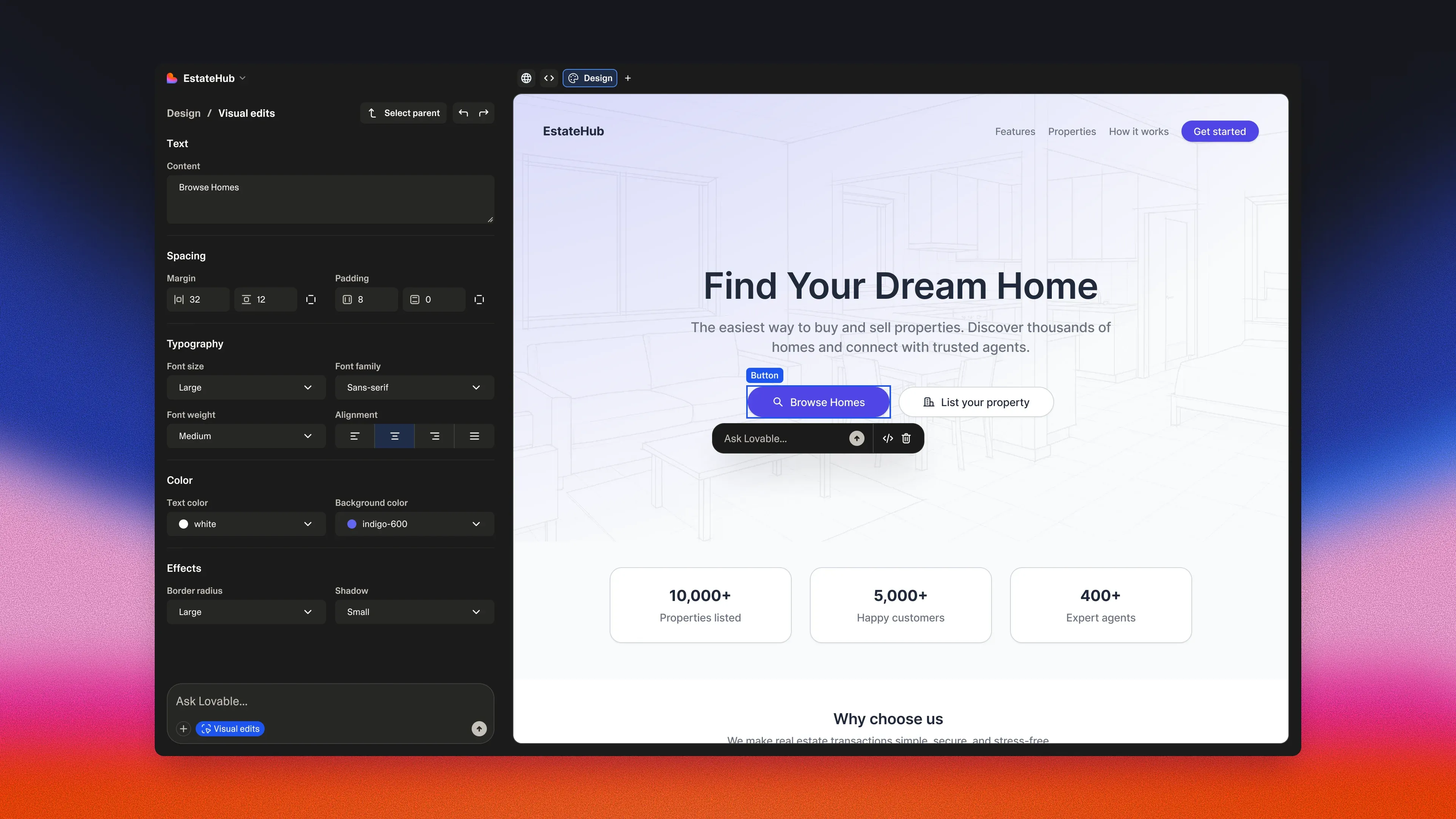
The generated stack
Lovable produces React with TypeScript and Tailwind CSS.
This matters more than it might appear. A generated codebase you cannot hand to a developer is a prototype with a deadline attached; one built on a mainstream stack is an asset with an ownership path. The exit strategy is built into the choice of technology rather than promised in marketing copy.
It also means the pool of people who can maintain the result is enormous. If the project succeeds and you hire, you are hiring for React and TypeScript - the largest talent pool in web development - rather than for familiarity with a proprietary builder.
Lovable Cloud
Lovable Cloud is the managed backend, and it includes authentication and row-level security built in, so users only see the data meant for them. Lovable handles end-to-end infrastructure - hosting, authentication, payments and integrations - on what it describes as enterprise-grade infrastructure.
Its billing is worth noting: the free allowance covers usage up to $25 per month, which typically covers early development and testing, with usage-based billing beginning when an app gains traction. That is a sensible model. You are not paying for backend capacity before anyone is using the product, and the cost arrives at the same time as the users who justify it.
Because the security model rests on row-level security, the same caveat applies here as on Supabase directly: a misconfigured policy fails quietly rather than loudly. We cover that failure mode in detail in the Supabase review, and it is worth reading before putting real user data behind a generated application. A tool that writes the policy for you does not remove your responsibility to verify it.
Two-way GitHub sync
Code lives in your own GitHub repository, synchronised in both directions. This is the most important structural decision in the product, and it has three consequences:
- You can hand the repository to an engineer at any point, with full history.
- You can edit locally and have changes reflected back.
- If you stop paying, you keep a working codebase rather than losing access to a hosted artefact.
For anyone weighing vendor risk, that third point changes the calculation substantially. The worst case is not losing the product; it is losing the subscription and keeping the code.
Credit Economics: The Part Competitors Describe Vaguely
Most Lovable reviews say “it gets expensive”. Few explain the mechanism, which is what you actually need in order to forecast spend.
One balance, three consumers
A single credit balance covers three distinct activities: building applications, hosting through the Cloud backend, and AI features inside your deployed app. A credit is the unit of measurement across the entire workspace.
That unification is convenient and it obscures attribution. A balance draining faster than expected could be heavy iteration, production traffic, or in-app AI usage, and the single number does not tell you which without inspecting history.
How build costs are calculated
In Lovable’s own words, “Cost depends on the complexity of the request and the work completed.” The documented examples span from 0.50 credits for styling a button to 2.00 credits for a complex landing page.
Plan mode is different and predictable: 1 credit per message, flat. For work where you want cost certainty - thinking through an approach before building it - that predictability is useful.
The allowances
- Free: 5 build credits per day, capped at 30 per calendar month
- Pro: 5 daily build credits, uncapped
- Business: 5 daily build credits, uncapped
All three plans additionally receive a monthly Cloud grant of 20 credits and a monthly AI grant of 4 credits. Daily build credits refresh at 00:00 UTC; monthly grants reset with the billing cycle.
Note the structure of the free tier carefully: five per day but only thirty per month means you exhaust the monthly cap after six active days. It is not a daily allowance you can use every day.
What the free tier realistically buys
Our own arithmetic, using the documented cost examples: 30 monthly credits at roughly 1 credit per meaningful change is about 30 substantive edits per month - or roughly 15 if your changes resemble the 2.00-credit landing page example.
That is enough to evaluate the product properly and build a small prototype. It is not enough to iterate toward a finished application, and the six-day practical limit means the evaluation is compressed rather than spread out.
The budgeting traps
Three things make Lovable’s spend harder to forecast than the credit table suggests, and all three are worth understanding before committing to a project.
Debugging consumes credits. Users widely report that when the AI attempts the same fix repeatedly, cost escalates. You are billed for the attempt, not the outcome - which means the runs that produce the least progress can cost the most. This inverts the usual intuition that difficult work is worth paying for; here, difficulty is precisely where value per credit collapses.
Top-up credits expire after 12 months. Buying a large balance in advance carries an expiry, so bulk purchasing has a deadline attached.
Long-running tasks check in at a default threshold of 20 credits, configurable between 20 and 100,000. That check-in is a safety valve. Raising the ceiling raises how much can be spent before the system pauses to ask, and the default is conservative for a reason.
Credit history is retained for up to 12 months, so retrospective analysis of where the balance went is possible - which is worth doing after the first month rather than after the first surprise.
Security: Basic Scan, Deep Scan and the Row-Level Security Question
Lovable’s security tooling is more developed than most tools in this category, and worth understanding precisely.
Basic scan runs automatically every time you publish, covering database configuration, row-level security policies and cloud project settings, completing in roughly 10 to 15 seconds.
Automatic and fast is the right design. A scan that requires remembering to run it does not get run, and one that takes five minutes gets skipped under deadline pressure. Fifteen seconds on every publish is short enough that nobody works around it.
Deep scan is available on demand and analyses the full codebase, taking around 3 minutes.
Auto-fix can resolve eligible findings during ordinary agent work. When enabled, Lovable receives the latest critical basic-scan findings as part of its context whenever you chat with it - meaning security issues inform subsequent generation rather than sitting unread in a report. That is a meaningful design choice: it closes the loop between detection and correction without requiring the user to understand the finding.
Lovable supports SOC 2 and GDPR requirements and provides security documentation and data protection agreements for enterprise review.
The honest framing
Two scanners, automatic execution and auto-fix constitute serious tooling, and better than most of this category offers.
But Lovable’s own security documentation places final responsibility for whether an application meets the bar for sensitive data on you, and the platform has a history of row-level security misconfiguration that gives that disclaimer weight rather than making it boilerplate.
The practical guidance is not “do not use it”. It is that a generated application handling real user data deserves the same review as a hand-written one. Run the deep scan. Read the policies rather than trusting that they were written correctly. Test access as a non-owner. Do not treat a passing basic scan as an audit, because it is a fifteen-second configuration check and was never intended to be one.
Pricing and Plan Selection
| Plan | Price | Credits | Feature threshold |
|---|---|---|---|
| Free | $0 | 5 build credits per day, capped at 30 per month | Community support, Git sync, unlimited workspace members |
| Pro | from $25/month (100 credits) or $250/year | Bands from 100 to 10,000 credits per month | Email support, custom domains, edit code, role-based permissions |
| Business | from $50/month (100 credits) or $500/year | Bands from 100 to 10,000 credits per month | Priority support, single sign-on, role-based access, design templates |
| Enterprise | Volume-based, contact sales | Custom | Dedicated support, audit logs, SCIM, scheduled security scans, design systems |
All of Free, Pro and Business include the 20-credit monthly Cloud grant, the 4-credit monthly AI grant, unlimited workspace members and workspace-private projects.
Read “from” literally
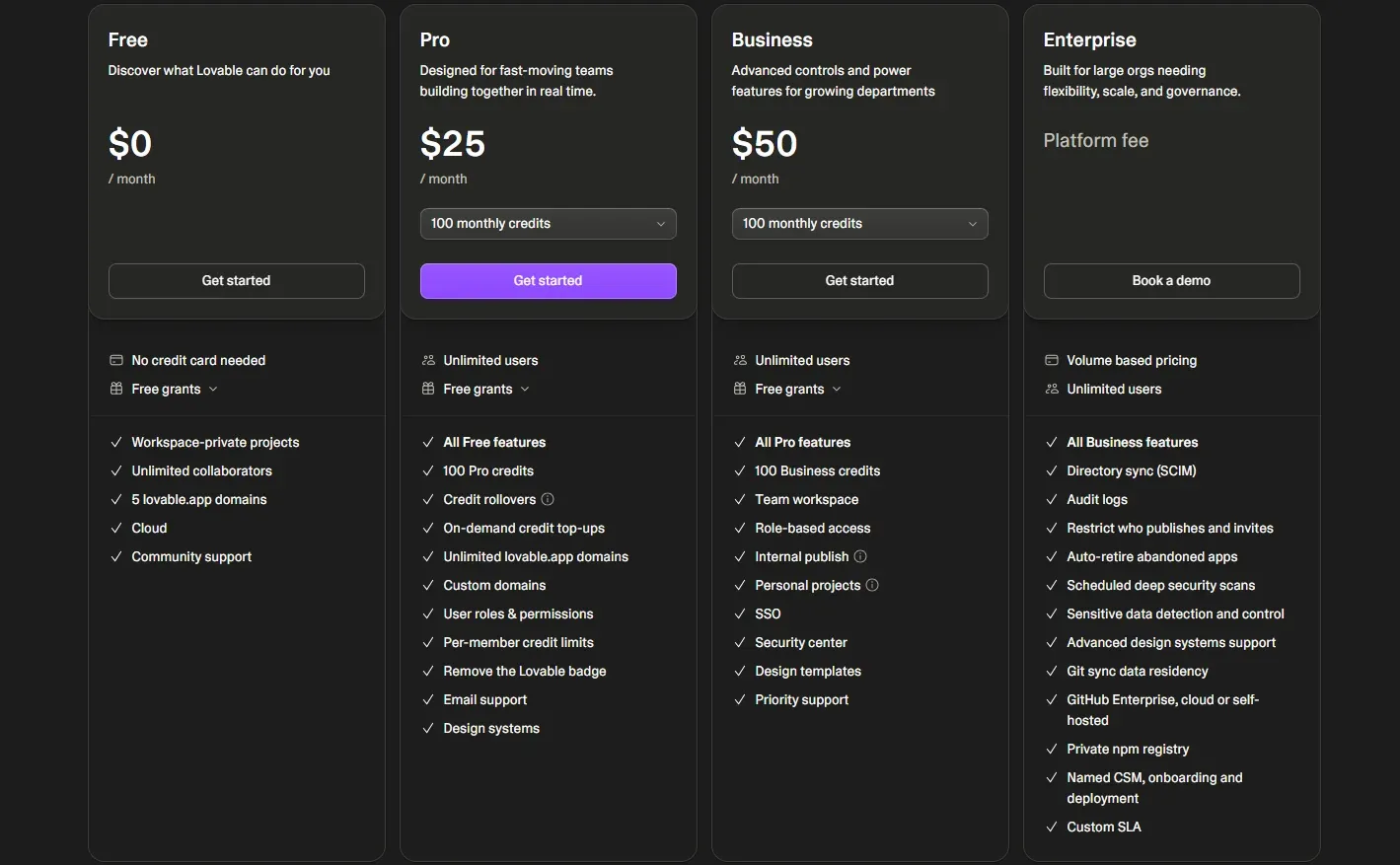
Pro and Business are not fixed prices. Both start at their headline figure for 100 monthly credits and scale up through credit bands to 10,000.
The $25 and $50 numbers describe the entry point of a range, not the cost of running a real project - a distinction that catches people out at the second invoice. Before budgeting, estimate your monthly credit consumption from the arithmetic above and find the band that fits, rather than anchoring on the headline.
Annual billing saves two months
$250 against $25 times 12 is $300, and $500 against $600. Paying annually costs ten months rather than twelve, about 16.7 per cent. (Our arithmetic.)
Where the tier boundaries fall
Unlimited workspace members on every plan, including Free, is unusually generous and removes seat count as a reason to upgrade - the same policy Fillout applies in a different category, and equally welcome here.
What forces the move up is capability: single sign-on at Business at $50, and audit logs, SCIM and scheduled security scans at Enterprise. If your organisation mandates single sign-on, the entry price is $50 rather than $25, and if it mandates audit logs you are in an Enterprise conversation regardless of your credit consumption.
Who Should Use Lovable, and Who Should Not
Strong fit: non-technical founders validating an idea; internal dashboards and tools that would otherwise sit in an IT backlog; anyone needing authentication, database and hosting configured in one pass; teams that want clean React output they can hand over later; projects where Supabase is a good backend fit anyway.
Poor fit: teams whose stack is not Supabase-shaped; applications with heavy multi-step business logic, where the AI needs the most correction and credits are consumed fastest; anyone needing native iOS or Android applications rather than responsive web; organisations with a fixed budget and unpredictable debugging volume, since that combination is precisely where credit billing is least forgiving.
Head-to-Head Comparisons
- Lovable vs v0: the most useful comparison in this category. v0 runs a sandbox that can import an existing GitHub repository and works inside it; Lovable’s strength is building something new end to end with a backend attached. If you have an existing codebase, that difference decides it. Full breakdown in Lovable vs v0.
- Lovable vs Replit: Replit is a general-purpose cloud IDE with an agent layered on top and broad language support; Lovable is opinionated about React and Supabase and optimises for shipping a working product quickly. Breadth against focus. See Lovable vs Replit.
- Lovable plus Supabase: not competitors. Supabase is the backend Lovable generates against, which means choosing Lovable is also choosing Supabase - worth reading before evaluating either in isolation.
- Lovable plus Firecrawl: complementary for data-driven applications. Firecrawl supplies clean web content; Lovable builds the interface that presents it.
Plan pricing, credit mechanics, security scan behaviour and Cloud billing in this review were verified against Lovable’s official subscription documentation, messaging-limits documentation and security documentation on 18 August 2026. Free-tier capacity estimates and the annual saving are our own arithmetic from Lovable’s published figures. Reports that debugging loops inflate credit consumption come from widespread user accounts rather than official documentation and are labelled as such. Confirm current terms at lovable.dev.
Evaluation Metrics
Accuracy in parsing call graphs, types, and catching subtle edge cases without noise.
Average execution time under 45s across PR triggers on GitHub Actions & GitLab CI.
Detection rate of OWASP Top 10 flaws, SQL injection risks, and leaked API secrets.
Time saved per senior reviewer and ease of interactive inline PR code chat.
Pros & Cons
What We Like (Pros)
- Generated React and TypeScript code is clean enough to hand to a developer later
- Lovable Cloud ships authentication and row-level security without separate setup
- A basic security scan runs automatically on every publish in 10 to 15 seconds
- Two-way GitHub sync keeps the code in your own repository
Considerations (Cons)
- Backend is tied to Supabase, so unusual backend work needs manual intervention
- The free plan is capped at 5 build credits per day and 30 per calendar month
- Debugging loops consume credits, making spend hard to forecast on complex apps
- Single sign-on requires the Business plan and audit logs require Enterprise
Lovable vs the Closest Alternatives
Alternatives named in this review, not tools that merely share a category.
| Feature Matrix |  Lovable Reviewed Tool |  v0 by Vercel |  Replit |
|---|---|---|---|
| Rating Score | 4.8 / 5.0 | 4.8 / 5.0 | 4.9 / 5.0 |
| Pricing Model | Free (30 credits/mo) • Pro from $25/mo • Business from $50/mo | Free ($5 credits/mo) • Plus $30/user/mo • Business $100/user/mo | Free Starter • Core $20/mo • Pro $100/mo |
| Best For | Non-technical founders validating an idea; internal dashboards and tools that would otherwise sit in an IT backlog. | Teams already deploying on Vercel with Next.js and shadcn/ui; design-to-code workflows anchored in Figma. | Developers who want a full Linux container with root shell access from any browser, with no local toolchain to install; learners and quick experiments, covered by the free Starter tier. |
| Key Differentiator | Generates full-stack applications around Supabase from natural-language prompts | Prompt or Figma to Next.js and shadcn/ui, deployable straight to Vercel | Full Linux container with root shell and 50+ languages, in the browser |
| Action / Review | Try Free | Read Review | Read Review |
Full breakdown: Lovable vs v0 by Vercel, Lovable vs Replit.
Frequently Asked Questions
Does Lovable train AI models on private repository code?
No. Lovable strictly adheres to zero-data-retention standards. Code diffs and repository context are processed in ephemeral memory for the duration of the review execution and are never stored or used to train public models.
How do I configure custom coding standards and linters?
Lovable reads a repository configuration file placed in the root directory. You can define rule severity, exclude specific paths, set language guidelines, and prompt instructions matching your team's style guide.
Is Lovable free for open-source software projects?
Public open-source repositories hosted on GitHub and GitLab receive free automated reviews with no cap on the number of repositories, pull requests, or contributors.
Which languages and frameworks does Lovable support?
Lovable covers the mainstream ecosystem - TypeScript/JavaScript, Python, Go, Java, Ruby, PHP, Rust, and C# - along with infrastructure-as-code formats such as Terraform, Dockerfiles, and Kubernetes manifests.
How does Lovable handle security scanning?
Lovable scans every incoming commit for hardcoded API keys, database credentials, SQL injection risks, and OWASP Top 10 security vulnerabilities before code is merged into production. High-priority security alerts are flagged directly inline within the pull request.


