

The Bottom Line
Railway is ranked #3 in our Hosting & Cloud category. Per-second billed PaaS for long-running services, workers and databases. We rate it 4.8/5.
Best for
Long-running services, background workers and cron jobs that serverless platforms handle awkwardly; monorepos with several services that need to talk to each other.
Considerations
Production databases requiring point-in-time recovery, read replicas or automated failover; applications needing the datastore close to users in multiple regions.
Executive Summary & Independent Verdict
Railway wins the deployment experience in this category, and it is not particularly close. You point it at a repository, it works out how to build and run the thing, and a few seconds later it is running - whether “the thing” is a web application, a background worker, a cron job, or a Postgres instance.
That strength has a boundary, and this review states it early rather than burying it in a footnote. Railway is an excellent application platform. It is a less mature database provider: on the default tier there is no point-in-time recovery, no read replicas and no automated failover, and databases run in a single region even when your application does not.
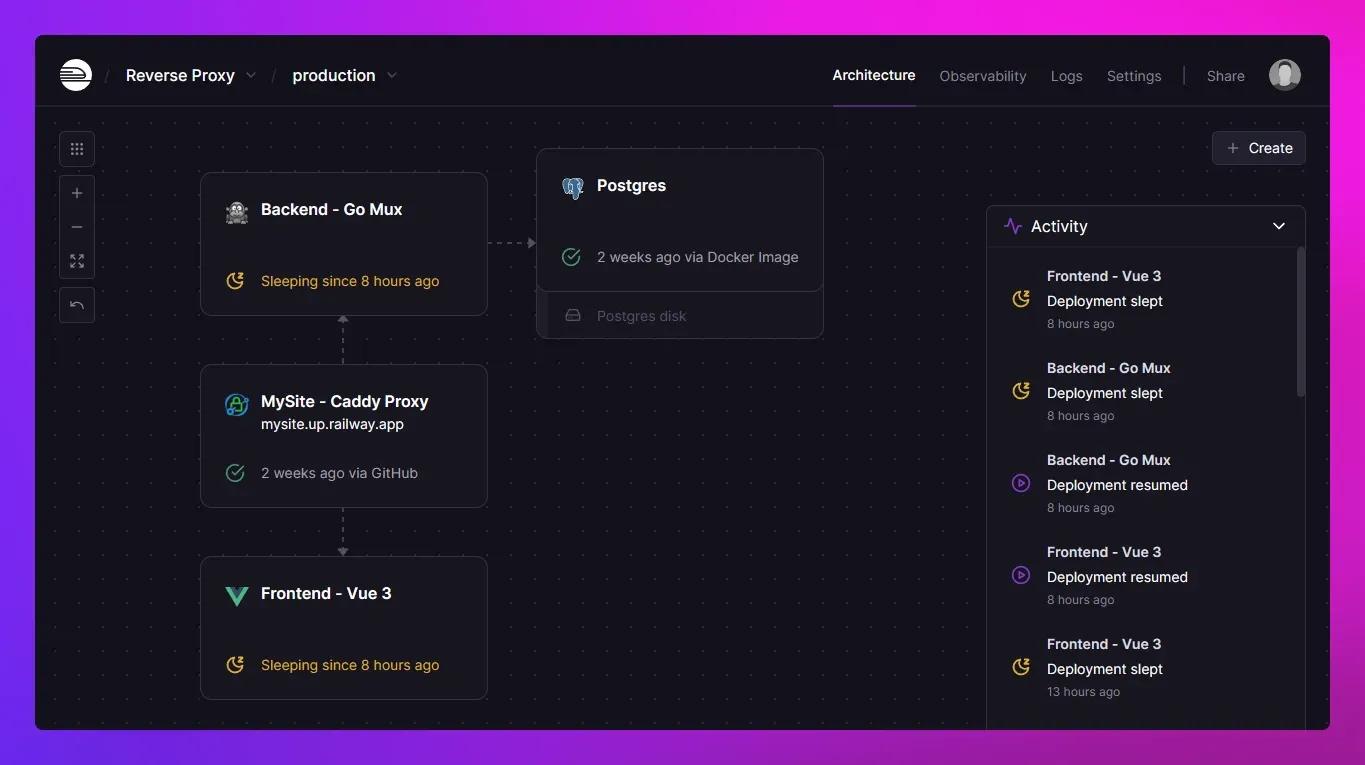
We place Railway at #3 in Hosting & Cloud. It sits behind Vercel and Supabase not on developer experience - where it arguably leads the entire category - but because the data-durability guarantees expected of a production database are the one area where it asks you to compromise, and that compromise is not always visible at evaluation time.
Per-Second Billing: How Railway Actually Charges
Railway’s pricing has two layers that are easy to conflate, and conflating them produces both overestimates and unpleasant surprises.
The plan fee is a credit, not a cap
The $5 on Hobby and $20 on Pro are monthly usage credits, not spending limits. You consume them at the metered rates below, and if you exceed them you keep going and pay the difference.
Two consequences follow. A service consuming $3 of metered usage on a $5 Hobby plan costs $5, not $8 - the credit is spent first, and the unused $2 does not roll over. And a service consuming $40 on the same plan costs $40, not $5 - there is no ceiling protecting you from a runaway process.
That second point deserves attention during evaluation. A misconfigured service that fails to sleep, or a memory leak that triggers repeated restarts, bills at the metered rate. Set spending alerts before you need them.
The metered rates
| Resource | Rate |
|---|---|
| Memory | $0.00000386 per GB per second |
| CPU | $0.00000772 per vCPU per second |
| Volumes | $0.00000006 per GB per second |
| Egress | $0.05 per GB |
| Object Storage | $0.015 per GB-month |
Per-second rates are precise and unreadable. The following conversions are our own arithmetic, based on a 30-day month of 2,592,000 seconds:
| Resource running continuously | Calculation | Monthly cost |
|---|---|---|
| 1 GB RAM | $0.00000386 × 2,592,000 | around $10.00 |
| 1 vCPU | $0.00000772 × 2,592,000 | around $20.01 |
| 10 GB volume | $0.00000006 × 2,592,000 × 10 | around $1.56 |
Worked examples
Our own arithmetic for three common service shapes running continuously:
| Service | Configuration | Monthly metered cost |
|---|---|---|
| Small API | 0.5 vCPU, 512 MB | around $15 |
| Standard web service | 1 vCPU, 2 GB | around $40 |
| Background worker | 2 vCPU, 4 GB | around $80 |
Why the model favours some workloads and punishes others
Because metering is per-second, a service that is idle costs almost nothing. A staging environment used two hours a day costs roughly a twelfth of one running continuously. A worker that wakes on a queue message and sleeps the rest of the time is close to free. A preview environment spun up for a pull request and destroyed on merge bills only for the hours it existed.
The inverse is equally true. The standard web service above costs around $40 per month in metered usage, and a fixed-price competitor may well undercut it. Railway rewards variability and charges fairly for constancy - which means the question to ask during evaluation is not “how much does Railway cost?” but “how much of the time is my workload actually doing something?”
For a team with many low-traffic internal services, the answer strongly favours Railway. For a single always-busy production service, it is competitive rather than cheap.
The Database Question
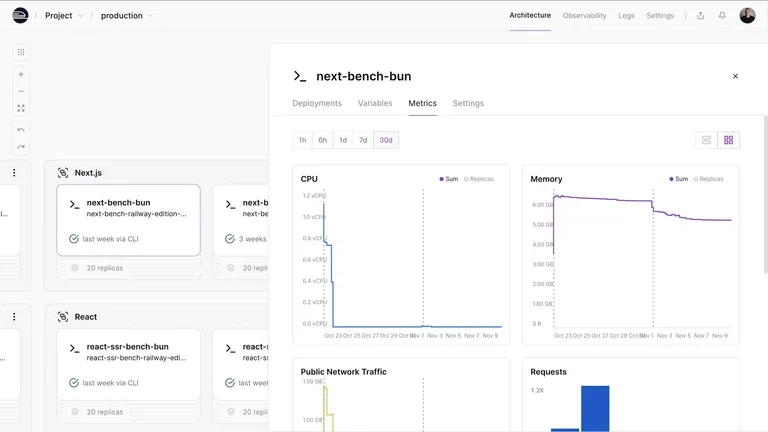
This is the section that should determine whether Railway is right for you, and it is the one most comparisons skip in favour of price tables.
Containerised databases
Railway runs databases as containers, provisioned the same way as any other service. That is what makes them so pleasant to create - a Postgres instance is two clicks and it is wired into your application’s environment variables, with no connection string to copy or network rule to configure.
It is also the source of the limitations below. A database container is a database process with storage attached; the surrounding machinery that a managed database service provides - continuous archiving, replica orchestration, failover coordination - is a separate and substantial layer.
What the default tier does not include
On the default tier there is no point-in-time recovery, no read replicas and no automated failover. Each of those absences means something concrete:
- No point-in-time recovery. You cannot rewind the database to 14:32 yesterday, before the bad migration ran. Recovery depends on whatever backup you took, at whatever interval you took it, which means your worst-case data loss is the gap between backups.
- No read replicas. Read traffic cannot be spread across additional instances. Analytics queries compete with production traffic on the same instance, and the usual mitigation - send reporting queries to a replica - is unavailable.
- No automated failover. If the instance fails, recovery is a manual operation performed by whoever is awake.
The experimental high-availability upgrade
Railway launched a high-availability Postgres upgrade in March 2026 that adds automatic failover. Railway itself warns it is not production-ready yet.
That warning is worth respecting rather than discounting. A vendor labelling its own feature as unready for production is unusually direct, and it is exactly the signal to treat the feature as a preview. Building a disaster-recovery plan around it today would mean depending on something its own author says is not ready.
Single-region databases
Railway supports multi-region deployment for the application, but databases still run in a single region. Every replica of your application, wherever it sits, queries the same one place.
The practical effect is worth visualising. Deploy your application to Europe and North America expecting locality, and your European users get fast application response and transatlantic database latency on every query. Multi-region deployment improves the parts of the request that do not touch data, which for most applications is the smaller half.
The practical conclusion
None of this makes Railway a bad platform. It makes it a platform where the sensible architecture is often Railway for services, something else for the primary datastore.
Supabase is a natural pairing: managed Postgres with backup retention and documented recovery guarantees, with Railway running the workers, APIs and scheduled jobs that talk to it. That split plays to each platform’s strength and avoids asking either to do the thing it does least well.
Note: the database limitations in this section come from third-party technical analysis rather than a single official statement. Verify current capabilities in Railway’s documentation before making an architectural decision on them.
Plans and Resource Ceilings
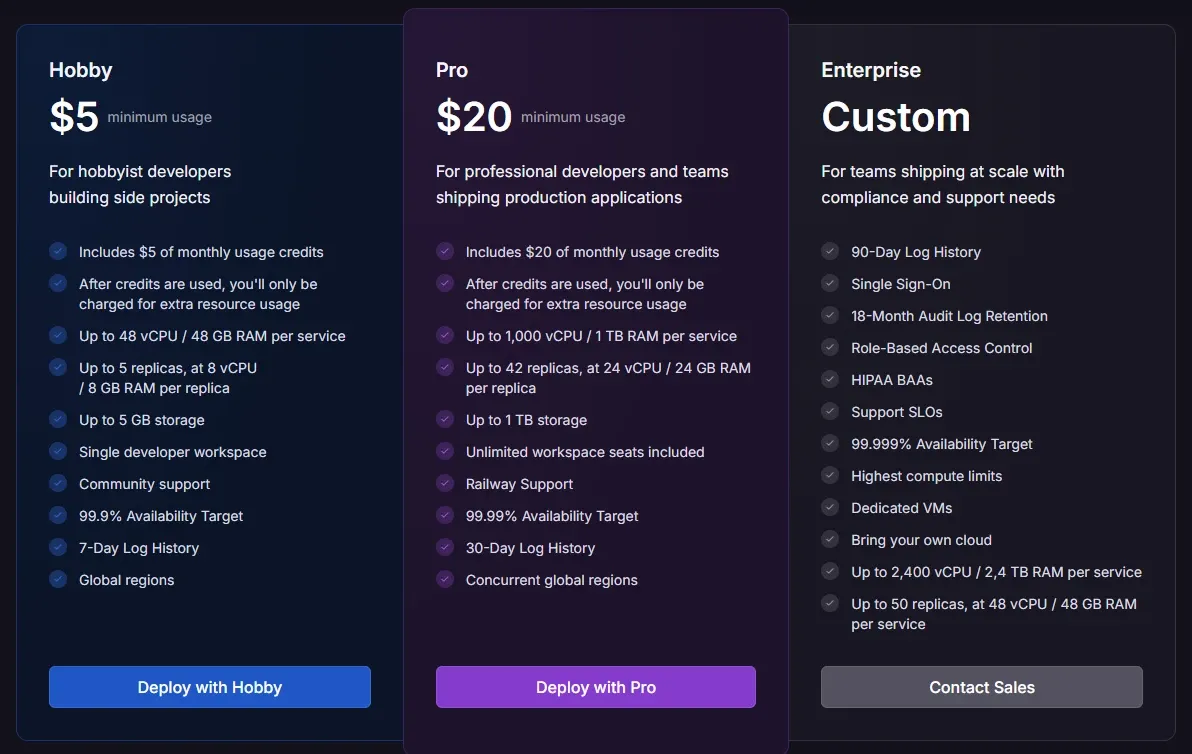
| Plan | Price | Included credit | Resource ceilings |
|---|---|---|---|
| Free Trial | $0 with $5 credit for 30 days | $5 | Up to 2 vCPU / 1 GB per service, 2 replicas, 7-day log history. No credit card required |
| Free | $0/month | $1/month | Up to 1 vCPU / 0.5 GB per service, 1 replica, 3-day log history |
| Hobby | $5/month | $5/month | Up to 48 vCPU / 48 GB per service, 6 replicas, 7-day log history |
| Pro | $20/month per workspace | $20/month | Up to 1,000 vCPU / 1 TB per service, 42 replicas, 30-day log history |
| Enterprise | Custom | Custom | Contractual SLAs, SSO, dedicated support, procurement options |
Is the free plan usable?
Honestly: barely, and only for experiments.
One vCPU, half a gigabyte of RAM, a single replica and three days of log history describe a sandbox rather than an environment. The $1 monthly credit covers roughly two and a half hours of a 1 GB service by the arithmetic above, which means a continuously running free service will exhaust its credit within the first day of the month.
The Free Trial is the better evaluation path - $5 of credit over 30 days, higher ceilings at 2 vCPU and 1 GB, and no credit card required. That is a genuinely low-friction way to assess the platform properly before committing anything.
The Pro ceilings are generous
1,000 vCPU and 1 TB per service with 42 replicas is far beyond what most startups will approach.
The ceiling is not what limits you on Pro; the metered cost of using it is. A service configured at even a tenth of the Pro ceiling would bill in the thousands per month. Read the ceilings as an assurance that you will not hit an artificial wall, not as an allowance.
Log retention as a tier signal
Notice how log retention scales: 3 days on Free, 7 on Hobby and Free Trial, 30 on Pro. This is a better indicator of who each tier is for than the resource ceilings.
Three days means you can debug something that happened this morning. Thirty days means you can investigate a pattern a customer reports at the end of a month. If your team runs any kind of retrospective on incidents, that number matters more than the vCPU limit you will never reach.
Railway vs Render vs Fly.io
These three platforms are constantly compared, and the useful framing is that they charge in three different shapes rather than at three different prices.
| Railway | Render | Fly.io | |
|---|---|---|---|
| Model | Small plan fee plus per-second metering | Fixed price per instance | Pure pay-as-you-go, no base fee |
| Example price | Hobby $5 plus usage | Starter around $7/month (0.5 CPU, 512 MB) | shared-cpu-1x / 256 MB around $2.02/month |
| When idle | Costs almost nothing | Charged in full | Costs almost nothing |
| Free tier | $1 credit per month | Web services sleep after 15 minutes, 30 to 50 second wake | Previous $5 allowance removed for new accounts |
| Best at | Developer experience, bursty workloads | Predictable invoices, managed production infrastructure | Multi-region edge deployment, full Docker control |
Railway wins on deployment ergonomics and on workloads with variable load. Render wins when you want a fixed, forecastable invoice and managed production infrastructure. Fly.io wins on deploying close to users in multiple regions with complete control over the container.
One disclosure worth making: several of the most visible Railway comparisons on the web are published by Render, a direct competitor. Their figures may well be accurate, but they are not neutral, and the numbers above should be re-checked against each vendor’s own pricing page before you rely on them for a decision.
Operational Considerations
Three practical points that rarely appear in comparisons but affect daily use.
Environment variables and service linking. Railway injects connection details between linked services automatically. This is convenient and it creates an implicit dependency graph - worth understanding before you assume a service can be moved independently.
Build detection. Railway infers how to build most stacks without configuration, which is a large part of why it feels fast. When inference is wrong, the fix is a configuration file, and the failure mode during evaluation is usually “it built something, but not what I meant”.
Cost visibility. Because everything is metered per second across multiple resources, the relationship between a configuration change and its cost is less obvious than a fixed-price tier. Teams adopting Railway should establish the habit of checking usage weekly for the first month, until the mapping between what they run and what they pay becomes intuitive.
Who Should Use Railway, and Who Should Not
Strong fit: long-running services, background workers and cron jobs that serverless platforms handle awkwardly; monorepos with several services that need to talk to each other; teams that want strong deployment ergonomics without operating Kubernetes; workloads with variable or bursty load, where per-second metering genuinely pays; ephemeral preview environments created and destroyed per branch.
Poor fit: production databases requiring point-in-time recovery, read replicas or automated failover; applications needing the datastore close to users in multiple regions; teams that need a predictable fixed monthly invoice for budgeting; anyone whose primary requirement is the database rather than the compute around it.
Head-to-Head Comparisons
- Railway vs Supabase: often complementary rather than competing. Railway runs the services; Supabase provides managed Postgres with the backup and retention guarantees Railway’s default tier does not. Full breakdown in Supabase vs Railway.
- Railway vs Vercel: Vercel serves frontends and short-lived serverless functions; Railway runs the processes that need to stay alive. Many architectures use both, with Vercel at the edge and Railway behind it.
- Railway vs Netlify: different categories entirely. Netlify is Jamstack site hosting; Railway is general-purpose container hosting. They rarely appear on the same shortlist.
Plan pricing, resource ceilings and per-second rates in this review were verified against Railway’s official pricing page on 20 August 2026. Monthly cost conversions and the worked service examples are our own arithmetic from those per-second rates and are labelled as such. Database limitations and competitor figures come from third-party analysis, some of it published by direct competitors, and should be re-verified before use in an architectural decision. Confirm current terms at railway.com.
Evaluation Metrics
Accuracy in parsing call graphs, types, and catching subtle edge cases without noise.
Average execution time under 45s across PR triggers on GitHub Actions & GitLab CI.
Detection rate of OWASP Top 10 flaws, SQL injection risks, and leaked API secrets.
Time saved per senior reviewer and ease of interactive inline PR code chat.
Pros & Cons
What We Like (Pros)
- Per-second metering means idle and bursty workloads cost close to nothing
- Deploys long-running services, background workers and cron jobs, not just web apps
- Pro raises ceilings to 1,000 vCPU and 1 TB per service with 42 replicas
- Free Trial gives $5 of credit for 30 days with no credit card required
Considerations (Cons)
- Default database tier has no point-in-time recovery, read replicas or automated failover
- Databases run in a single region even when the application is multi-region
- The high-availability Postgres upgrade is experimental and not production-ready
- Free plan is capped at 1 vCPU, 0.5 GB, one replica and three-day log history
Railway vs the Closest Alternatives
Alternatives named in this review, not tools that merely share a category.
| Feature Matrix |  Railway Reviewed Tool |  Supabase |  Vercel |
|---|---|---|---|
| Rating Score | 4.8 / 5.0 | 4.9 / 5.0 | 4.9 / 5.0 |
| Pricing Model | Free ($1 credit/mo) • Hobby $5/mo • Pro $20/mo per workspace | Free • Pro from $25/mo • Team from $599/mo • Enterprise custom | Hobby Free • Pro $20/mo ($20 usage credit) • Enterprise custom |
| Best For | Long-running services, background workers and cron jobs that serverless platforms handle awkwardly; monorepos with several services that need to talk to each other. | Teams that want authentication, database, storage and realtime configured once rather than assembled from four vendors; TypeScript codebases, where generated types are a substantial ongoing saving. | Next.js applications, where first-party support is a genuine advantage; AI backends, agents and LLM streaming endpoints where idle time dominates. |
| Key Differentiator | Per-second-metered containers for long-running services, workers and cron jobs | Postgres with auth, storage, realtime and pgvector configured together | Active CPU billing on a Next.js-native platform with per-PR preview deploys |
| Action / Review | Try Free | Read Review | Read Review |
Full breakdown: Railway vs Supabase.
Frequently Asked Questions
Does Railway train AI models on private repository code?
No. Railway strictly adheres to zero-data-retention standards. Code diffs and repository context are processed in ephemeral memory for the duration of the review execution and are never stored or used to train public models.
How do I configure custom coding standards and linters?
Railway reads a repository configuration file placed in the root directory. You can define rule severity, exclude specific paths, set language guidelines, and prompt instructions matching your team's style guide.
Is Railway free for open-source software projects?
Public open-source repositories hosted on GitHub and GitLab receive free automated reviews with no cap on the number of repositories, pull requests, or contributors.
Which languages and frameworks does Railway support?
Railway covers the mainstream ecosystem - TypeScript/JavaScript, Python, Go, Java, Ruby, PHP, Rust, and C# - along with infrastructure-as-code formats such as Terraform, Dockerfiles, and Kubernetes manifests.
How does Railway handle security scanning?
Railway scans every incoming commit for hardcoded API keys, database credentials, SQL injection risks, and OWASP Top 10 security vulnerabilities before code is merged into production. High-priority security alerts are flagged directly inline within the pull request.


