

The Bottom Line
Firecrawl is ranked #6 in our AI Coding & Development category. Turns any website into clean markdown ready to feed an LLM. We rate it 4.7/5.
Best for
Teams building retrieval pipelines or AI agents that read the web; anyone maintaining bespoke scrapers who would rather stop.
Considerations
Small, budget-constrained volumes, where Hobby's per-page cost is high relative to what you get; industrial-scale scraping requiring extensive proxy rotation and residential addresses, where Bright Data is purpose-built.
Executive Summary & Independent Verdict
Every scraping tool can fetch a page. Firecrawl’s proposition is what it hands back: “Extract content from any URL as markdown, HTML, or structured JSON.”
That distinction sounds cosmetic and is not. Feeding raw HTML to a language model wastes tokens on navigation, cookie banners, tracking scripts and layout wrappers, and buries the content you actually wanted in noise that costs money to process. Cleaning it up means writing and maintaining a parser for every site shape you encounter - a task that is never finished, because sites change.
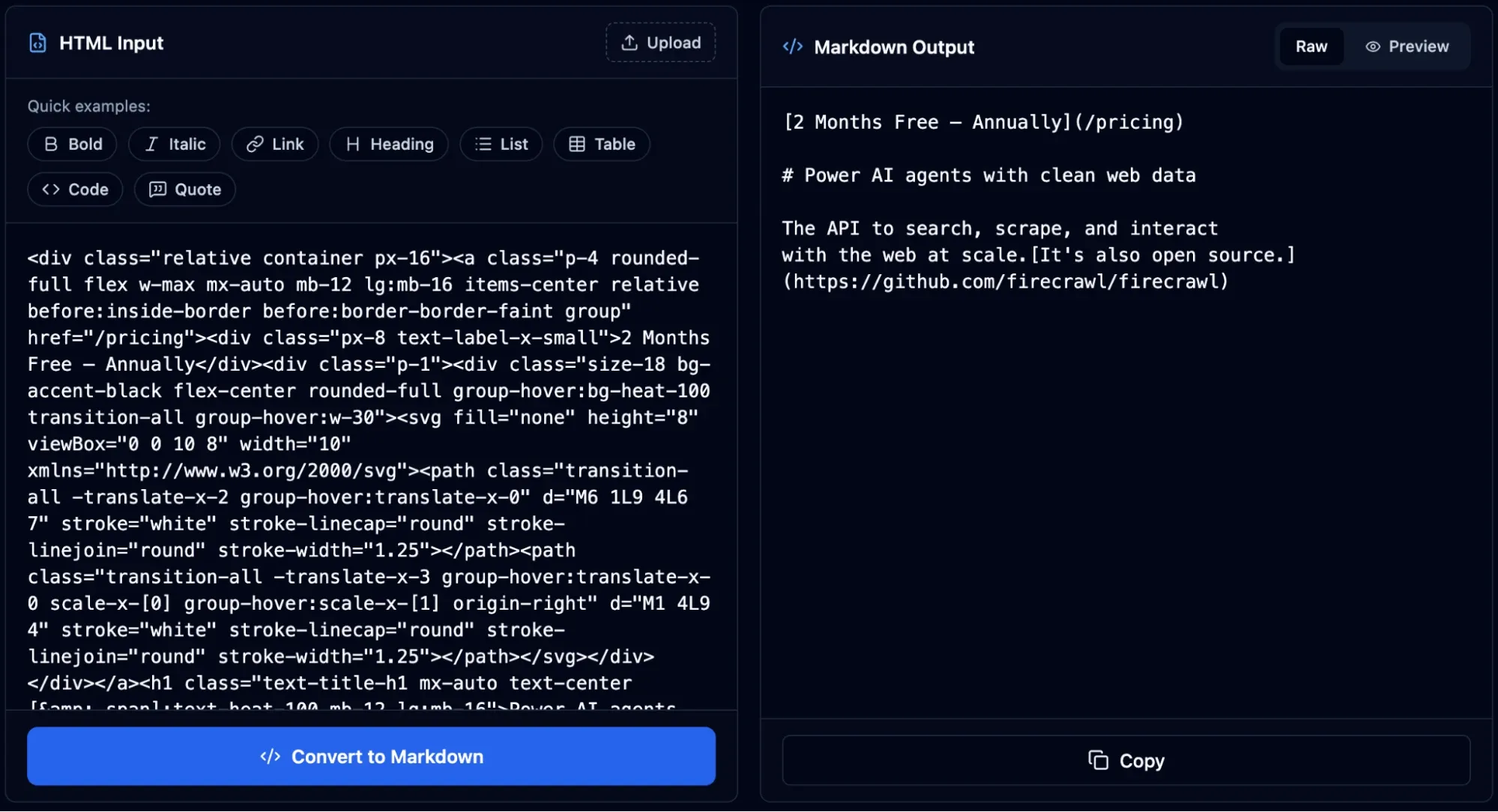
Firecrawl removes that layer, and for anyone building a retrieval pipeline or an agent that reads the web, that is the whole value. It also absorbs the operational misery of scraping: “Proxies, anti-bot, JavaScript rendering, and dynamic content.” Anyone who has maintained a scraper knows those four items consume more engineering time than the extraction logic ever does.
We place Firecrawl at #6 in AI Coding & Development. It is not a tool everyone needs, but for teams whose product depends on reading the web, it removes an entire category of work that produces no visible product improvement.
The Real Product: Clean Output, Not Just Fetching
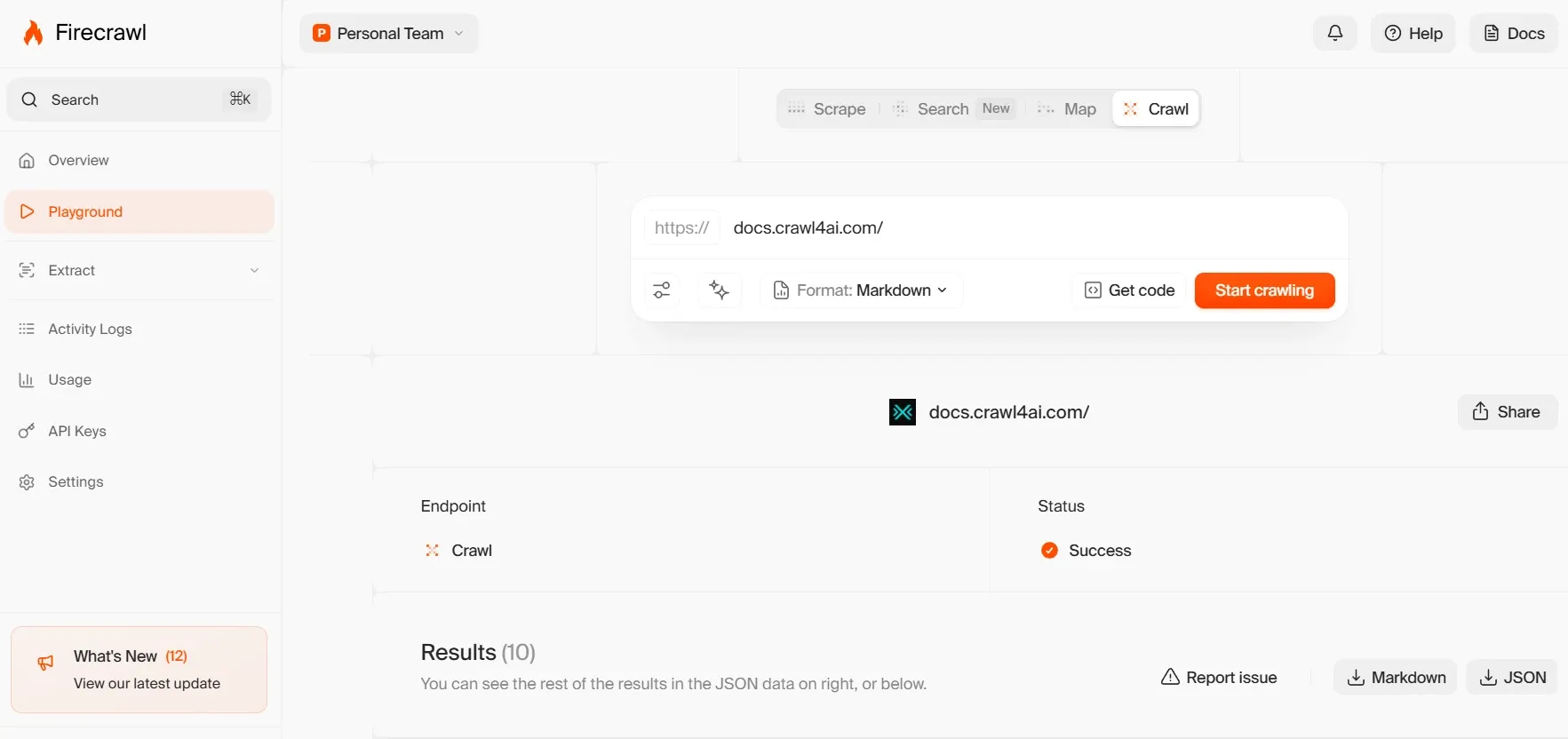
The seven capabilities
Firecrawl’s documented surface is broader than “scraping” suggests:
| Capability | Official description |
|---|---|
| Scrape | “Extract content from any URL as markdown, HTML, or structured JSON” |
| Crawl | “Recursively gather content from entire sites” |
| Map | “Discover all URLs on a website” |
| Search | “Search the web and get full page content from results” |
| Interact | “Click, fill forms, extract dynamic content” |
| Parse | “Turn local PDFs, DOCX, XLSX, HTML, and more into Markdown or structured JSON” |
| Agent | “Autonomous web data gathering powered by AI” |
Which one you actually need
Map before Crawl. Map discovers the URLs on a site without fetching every page. Running Map first lets you filter to the sections you care about, then Crawl only those.
The difference is not marginal. On a documentation site, that is the gap between spending credits on the reference pages you wanted and spending them on the entire changelog archive, the blog, and eight years of release notes. For any crawl larger than a few hundred pages, Map-then-filter should be the default pattern rather than an optimisation.
Interact is what separates it from simpler tools. Content behind a login, a form submission, or a “load more” button is invisible to a fetch-and-parse scraper. Being able to click and fill forms brings that content into reach, and it covers a category that would otherwise require driving a browser yourself.
Parse extends beyond the web entirely. PDFs, DOCX and XLSX converted to markdown or structured JSON means the same pipeline that ingests web pages can ingest the document archive sitting on your file server. For retrieval work, that consolidation is genuinely useful - most organisations have more valuable content in documents than on their website.
Search combines discovery and retrieval in one call, returning full page content from results rather than just links, which removes a second round trip.
Output formats
Markdown, HTML, structured JSON and screenshots.
Markdown is the reason to be here. Structured JSON matters when you need specific fields rather than prose - extracting prices, dates or specifications into a schema rather than reading paragraphs. Screenshots are useful for visual verification of what was actually captured, which is the fastest way to diagnose a scrape that returned something unexpected.
MCP Server and Keyless Start
Two details make Firecrawl notably easy to adopt, and both reduce the cost of finding out whether it suits you.
It runs as an MCP server at https://mcp.firecrawl.dev/v2/mcp, connecting to “any AI tool via the Model Context Protocol”. An agent in Claude Desktop or Cursor can read the web through Firecrawl without a bespoke integration - the capability is simply available as tools.
This is the same architectural pattern appearing across the 2026 tools in this list, and it changes what integration means. Rather than writing a client, handling authentication and parsing responses, you point an MCP-capable agent at an endpoint.
No API key is needed to get started. Basic usage works without credentials, with higher rate limits once you add them.
For evaluating whether the output quality justifies the cost, that removes the signup step entirely. You can test the thing that actually matters - does the markdown it returns look like something you would want to feed a model? - before creating an account, which is unusual and welcome.
SDKs are available for Python and Node.js, alongside a CLI and community-maintained libraries.
Credit Economics: Where the Money Actually Goes
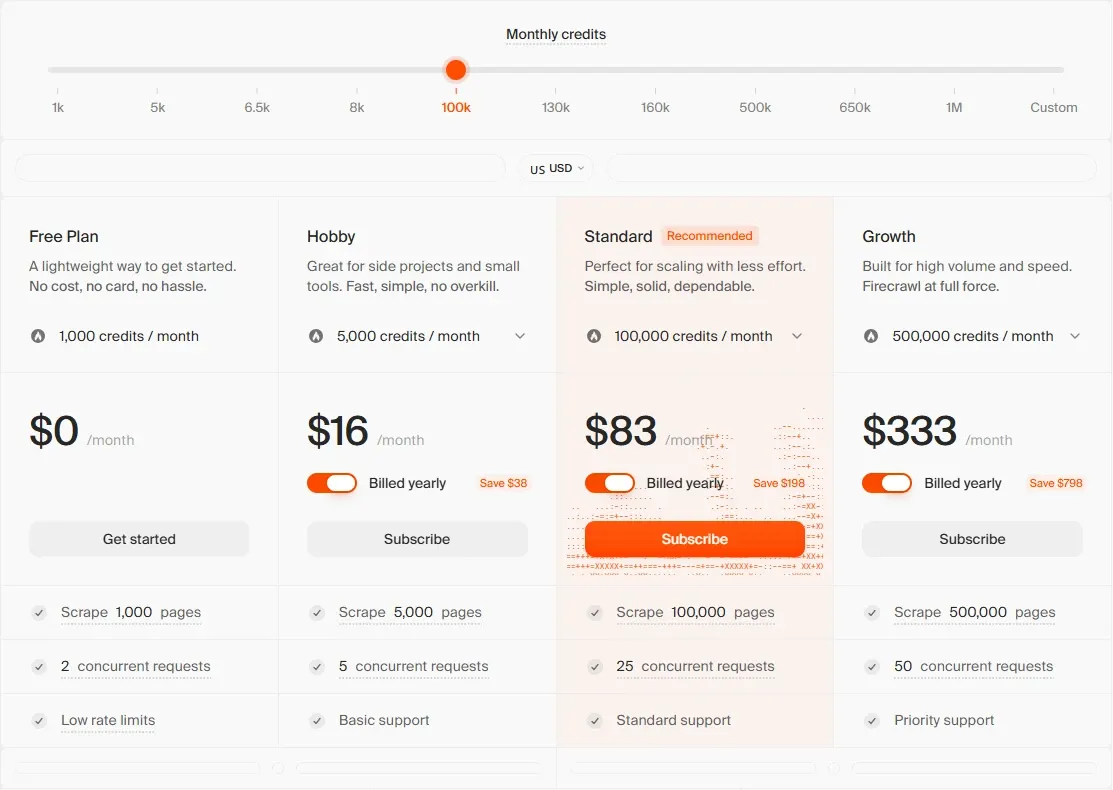
This is the section that should determine your plan choice, because the per-page economics run counter to intuition.
| Plan | Price (annual) | Credits per month | Pages | Concurrent | Support |
|---|---|---|---|---|---|
| Free | $0 | 1,000 | 1,000 | 2 | None |
| Hobby | $16/month, “Save $38” | 5,000 | 5,000 | 5 | Basic |
| Standard | $83/month, “Save $198” | 100,000 | 100,000 | 50 | Standard |
| Growth | $333/month, “Save $798” | 500,000 | 500,000 | 100 | Priority |
| Scale | $599/month, “Save $1,798” | 1,000,000 | 1,000,000 | 150 | Priority plus credit rollover |
| Enterprise | Custom | Custom | “unlimited pages” | Custom | Dedicated plus SLA, bulk discounts, zero-data retention, SSO |
Paying more costs less
Our own arithmetic, dividing monthly price by included pages:
| Plan | Monthly | Pages | Cost per 1,000 pages |
|---|---|---|---|
| Hobby | $16 | 5,000 | $3.20 |
| Standard | $83 | 100,000 | $0.83 |
| Growth | $333 | 500,000 | $0.67 |
| Scale | $599 | 1,000,000 | $0.60 |
Standard costs roughly a quarter as much per page as Hobby. The price rises five-fold while capacity rises twenty-fold.
The practical implication: if your usage is anywhere near the top of the Hobby allowance, you are paying a substantial premium per page for the privilege of a smaller invoice. Our arithmetic puts the crossover at around 1,600 pages per month - above that, Standard is cheaper per page even though the bill is larger, and the extra capacity is free headroom.
The missing middle
There is nothing between $16 and $83.
A team needing 15,000 pages a month has two options: pay Standard’s $83 for capacity it will not use, or stay on Hobby and manage within 5,000. This is the most awkward gap in the pricing, and it is worth raising with sales if you sit in it - a mid-tier at around $40 would serve a large band of users who currently have to round up or down.
Credit rollover is Scale-only
Unused credits roll over only on the $599 Scale plan. Every tier below it uses them or loses them.
That matters if your crawling is seasonal or project-driven rather than continuous. A team that crawls heavily for two weeks each quarter is paying for ten idle weeks with no carry-forward, which pushes the sensible strategy toward buying the smallest plan that covers the peak rather than the one that matches the average.
Note: we were unable to confirm how credits are consumed per operation type - whether a Crawl of one page costs the same as a Scrape, or whether Interact and Agent carry a premium. Firecrawl’s introduction documentation does not specify this. Check the credit cost of your specific operations before budgeting, because a per-page assumption may understate the real figure substantially if the operations you rely on cost more.
Concurrency Is the Hidden Limit
Credits determine how much you can crawl. Concurrency determines how long it takes, and it is the constraint people discover after committing.
The ladder runs 2, 5, 50, 100, 150 concurrent requests from Free to Scale, and the jump from Hobby to Standard is tenfold - a larger relative increase than the credit jump.
The effect compounds on large jobs. Our own illustrative arithmetic, assuming a page takes roughly two seconds to fetch and process:
| Job size | At 5 concurrent (Hobby) | At 50 concurrent (Standard) |
|---|---|---|
| 10,000 pages | around 1.1 hours | around 7 minutes |
| 100,000 pages | around 11 hours | around 1.1 hours |
| 500,000 pages | around 55 hours | around 5.5 hours |
Same credits, entirely different operational experience. A crawl that finishes overnight is a scheduled job; one that takes two and a half days is a project that needs monitoring.
If you crawl on a schedule and results must be ready by morning, concurrency rather than credits is the number that decides your plan.
Enterprise: Zero-Data Retention and Single Sign-On
The Enterprise tier adds zero-data retention, single sign-on, bulk discounts, custom concurrency and a dedicated support SLA.
Zero-data retention is the meaningful one. If you are crawling competitor sites, licensed content, or anything commercially sensitive, a guarantee that the vendor does not retain what passed through the pipeline is often a procurement requirement rather than a preference. It is the same consideration that appears in Devs.ai’s zero-training agreements and v0’s training opt-out: what the vendor keeps matters as much as what it does.
Legal and Ethical Considerations
Any review of a scraping tool that omits this section is doing readers a disservice.
Firecrawl is a general-purpose tool, and like any such tool its legality depends entirely on use. The considerations that belong in the decision:
- robots.txt states the site’s crawling preferences. Ignoring it is technically trivial and ethically material.
- Terms of service of the target site, which may prohibit automated access regardless of what robots.txt permits. That is a contractual question, not a technical one.
- Copyright - extracting content is not the same as being licensed to republish or redistribute it.
- Personal data - crawling pages containing personal information brings GDPR and comparable regimes into scope, and public visibility does not make data unregulated.
- Rate and load - even where crawling is permitted, hammering a small site is antisocial. The concurrency limits above are also a courtesy budget, and running at 150 concurrent against a small independent site is not a neutral act.
Firecrawl handling “anti-bot” measures is a capability, and capability is not permission. A tool that can bypass a restriction does not settle whether you should - that remains a judgement the operator makes, and owns.
Note: we did not locate an explicit robots.txt compliance policy in Firecrawl’s introduction documentation. If compliance posture matters for your use case, confirm it with Firecrawl directly rather than assuming a default in either direction.
Who Should Use Firecrawl, and Who Should Not
Strong fit: teams building retrieval pipelines or AI agents that read the web; anyone maintaining bespoke scrapers who would rather stop; workloads needing content from behind forms or JavaScript-rendered pages; projects consolidating web and document ingestion into one pipeline; volumes at or above the Standard tier, where per-page economics are strongest.
Poor fit: small, budget-constrained volumes, where Hobby’s per-page cost is high relative to what you get; industrial-scale scraping requiring extensive proxy rotation and residential addresses, where Bright Data is purpose-built; teams able to run an open-source crawler and with the operational capacity to keep it working.
Head-to-Head Comparisons
- Firecrawl vs Bright Data: different problems that look similar from a distance. Bright Data is proxy and data-collection infrastructure built for scale and for getting past defences; Firecrawl is built for output quality and developer ergonomics. If your blocker is being blocked, that is Bright Data. If your blocker is messy HTML, that is Firecrawl. Most AI teams have the second problem.
- Firecrawl vs open-source crawlers: the trade is money against operations. Self-hosting removes the subscription and adds proxy management, anti-bot handling and browser infrastructure to your responsibilities - which is a reasonable trade only if someone owns that work.
- Firecrawl plus v0 or Lovable: complementary. Firecrawl supplies the content; v0 and Lovable build the application that presents it.
- Firecrawl plus Supabase: the standard retrieval architecture. Firecrawl produces clean text, Supabase stores it alongside embeddings in pgvector, and the application queries both together.
Endpoints, output formats, SDK availability, MCP server address and keyless access in this review were verified against Firecrawl’s official documentation, and plan pricing against its pricing page, on 15 August 2026. Cost-per-page figures, the crossover point and crawl-duration illustrations are our own arithmetic, labelled as such. Per-operation credit consumption and robots.txt policy could not be confirmed and are flagged where relevant. Confirm current terms at firecrawl.dev.
Evaluation Metrics
Accuracy in parsing call graphs, types, and catching subtle edge cases without noise.
Average execution time under 45s across PR triggers on GitHub Actions & GitLab CI.
Detection rate of OWASP Top 10 flaws, SQL injection risks, and leaked API secrets.
Time saved per senior reviewer and ease of interactive inline PR code chat.
Pros & Cons
What We Like (Pros)
- Returns clean markdown, removing the need for a custom HTML parsing layer
- Cost per page drops roughly fourfold moving from Hobby to Standard
- Hosted MCP server connects the API to any Model Context Protocol client
- Handles proxies, anti-bot measures, JavaScript rendering and dynamic content
Considerations (Cons)
- No tier between Hobby at $16 and Standard at $83, a fivefold jump
- Hobby concurrency is capped at 5 requests, slowing large crawls
- Credit rollover is reserved for the $599 Scale plan
- Cost per page on Hobby is around four times the Standard rate
Firecrawl vs the Closest Alternatives
Alternatives named in this review, not tools that merely share a category.
| Feature Matrix |  Firecrawl Reviewed Tool |  Bright Data |
|---|---|---|
| Rating Score | 4.7 / 5.0 | 4.8 / 5.0 |
| Pricing Model | Free (1,000 credits) • Hobby $16/mo • Standard $83/mo • Scale $599/mo | Residential from $2.50/GB • Datacenter from $0.90/IP • Scraper APIs from $0.75/1k records |
| Best For | Teams building retrieval pipelines or AI agents that read the web; anyone maintaining bespoke scrapers who would rather stop. | Commercial data collection operations at meaningful volume; price and availability monitoring across many retailers. |
| Key Differentiator | Returns clean Markdown or structured JSON ready for language models, not raw HTML | Proxy networks and scraper APIs for sites that actively block collection |
| Action / Review | Try Free | Read Review |
Frequently Asked Questions
Does Firecrawl train AI models on private repository code?
No. Firecrawl strictly adheres to zero-data-retention standards. Code diffs and repository context are processed in ephemeral memory for the duration of the review execution and are never stored or used to train public models.
How do I configure custom coding standards and linters?
Firecrawl reads a repository configuration file placed in the root directory. You can define rule severity, exclude specific paths, set language guidelines, and prompt instructions matching your team's style guide.
Is Firecrawl free for open-source software projects?
Public open-source repositories hosted on GitHub and GitLab receive free automated reviews with no cap on the number of repositories, pull requests, or contributors.
Which languages and frameworks does Firecrawl support?
Firecrawl covers the mainstream ecosystem - TypeScript/JavaScript, Python, Go, Java, Ruby, PHP, Rust, and C# - along with infrastructure-as-code formats such as Terraform, Dockerfiles, and Kubernetes manifests.
How does Firecrawl handle security scanning?
Firecrawl scans every incoming commit for hardcoded API keys, database credentials, SQL injection risks, and OWASP Top 10 security vulnerabilities before code is merged into production. High-priority security alerts are flagged directly inline within the pull request.


