

The Bottom Line
Supabase is ranked #2 in our Hosting & Cloud category. Managed Postgres with auth, realtime, storage and vector search in one project. We rate it 4.9/5.
Best for
Teams that want authentication, database, storage and realtime configured once rather than assembled from four vendors; TypeScript codebases, where generated types are a substantial ongoing saving.
Considerations
Vector workloads beyond roughly 10 million embeddings; latency-critical synchronous paths that cannot absorb edge-function cold starts.
Executive Summary & Independent Verdict
Supabase is usually introduced as “the open-source Firebase alternative”, and that framing does it a disservice. Firebase is a document store with a proprietary query model and a proprietary security language. Supabase is Postgres - the actual database, with its extensions, its constraints, its query planner and its permission model intact.
That single fact explains both why teams adopt it in an afternoon and why some of them get hurt six months later. You inherit everything good about Postgres, including portability, mature tooling and thirty years of accumulated operational knowledge that transfers directly. You also inherit everything sharp about Postgres, most notably row-level security, whose failure mode is silence rather than an error.
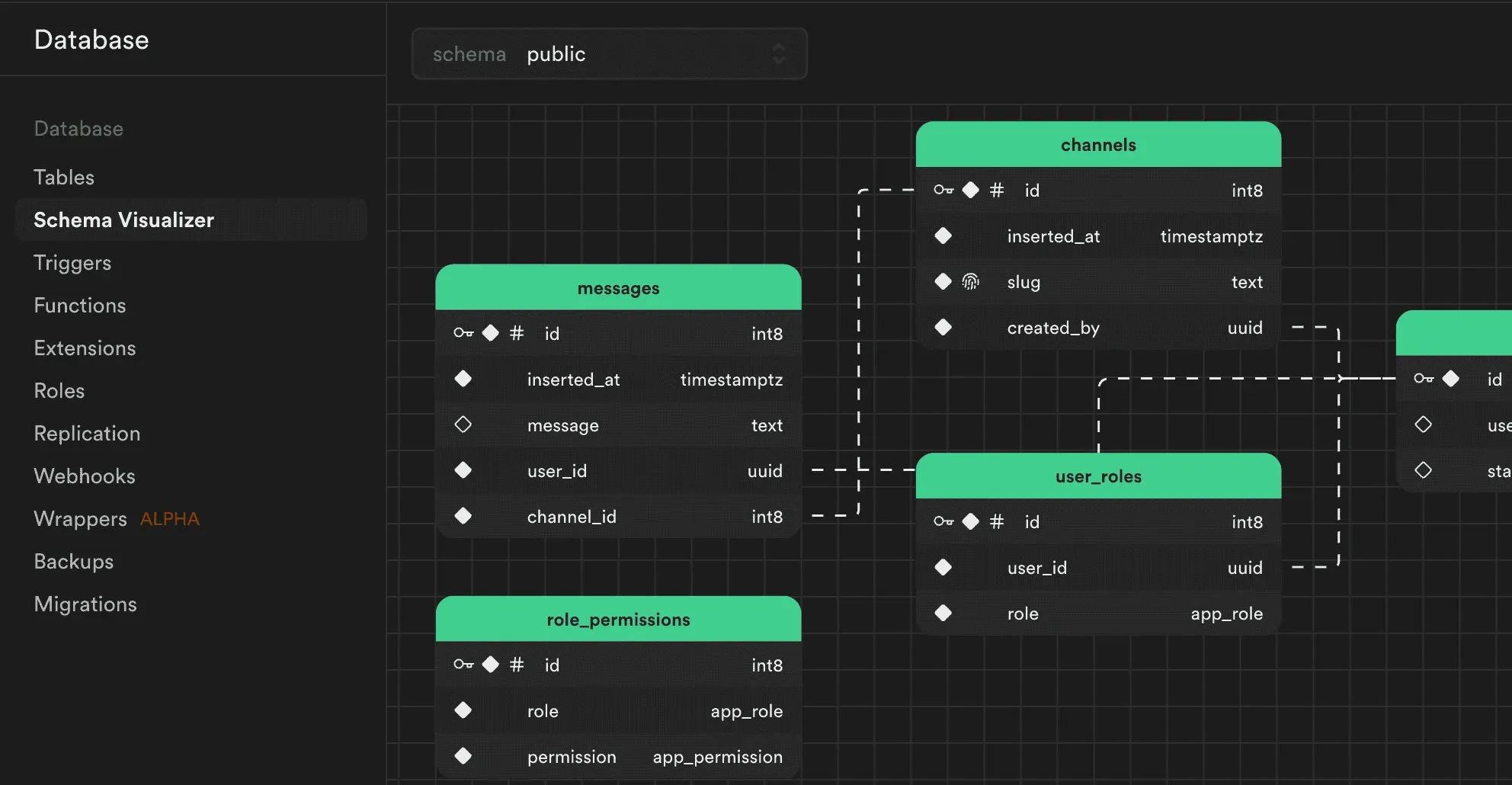
We place Supabase at #2 in Hosting & Cloud, immediately behind Vercel. It ranks below only because its scope is narrower - it is the data layer rather than a general compute platform - not because anything about the execution is weaker. For teams building on Postgres, nothing else in this category collapses as much infrastructure into a single project.
What You Actually Get: Postgres, Not a Black Box
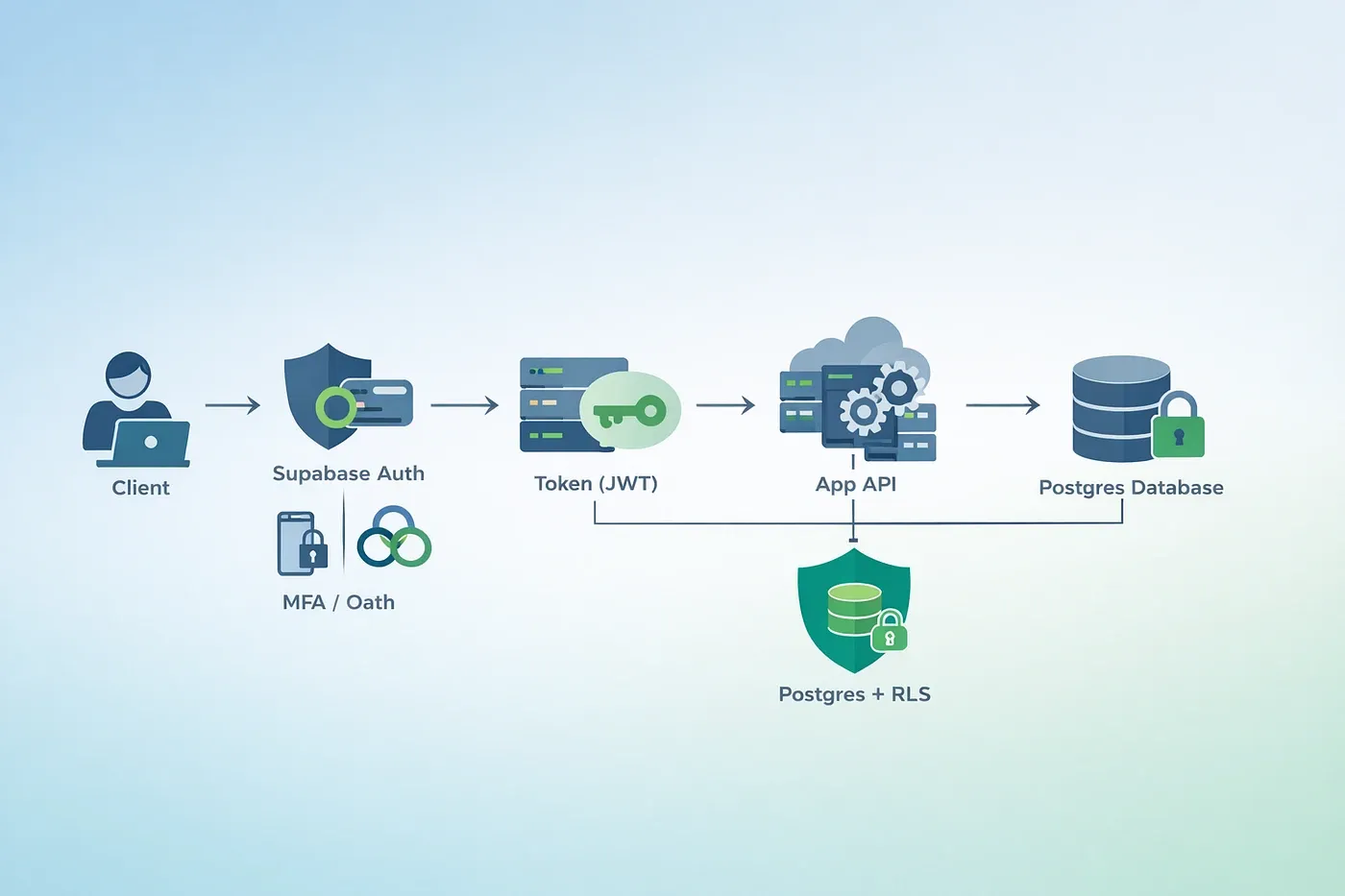
Authentication and row-level security
Authentication is wired directly to the database’s permission model. Rather than enforcing access rules in application code - where every new endpoint is another chance to forget one - you write row-level security policies and the database enforces them for every query, from every client, forever.
The architectural argument for this is strong. Application-layer authorisation has to be re-implemented in every code path that touches data: the REST endpoint, the GraphQL resolver, the background job, the admin panel, the CSV export someone added last quarter. Database-layer authorisation is enforced once, below all of them, and cannot be bypassed by forgetting a check.
For multi-tenant applications this is the correct architecture. It is also the feature that most often goes wrong, and we return to that below.
Realtime, storage and edge functions
Realtime subscriptions push database changes to connected clients, which removes the need to build a separate websocket layer for features like live dashboards, collaborative editing or notification feeds.
File storage handles uploads with the same permission model applied, so access rules for files can follow the same logic as access rules for rows.
Edge Functions run on Deno and deploy globally, handling webhooks and scheduled jobs. Deno rather than Node is a deliberate choice - it brings a permissions model and TypeScript support without a build step - and it is worth knowing before you assume npm-ecosystem compatibility.
Generated TypeScript types
This is the most under-rated feature in the product.
Supabase generates TypeScript types directly from your schema - every table and every column fully typed, with zero manual type maintenance. Add a column, regenerate, and every query that touches it is type-checked. Rename a column and your build fails at exactly the call sites that need updating, rather than at runtime in production.
Teams that have maintained a hand-written type layer against a live database will recognise how much work that removes, and how much silent drift it prevents. The types cannot disagree with the schema, because they are derived from it.
pgvector
Vector storage and querying live inside Postgres itself via pgvector, used for semantic search, retrieval pipelines, recommendation systems and AI applications.
The architectural advantage is that embeddings sit in the same database as the rows they describe. A single query can filter by both relevance and business logic - find documents semantically similar to this query, belonging to this organisation, created in the last ninety days, that the current user is permitted to see. With a separate vector store, that becomes two queries and an application-layer join, and the permission filter has to be re-implemented outside the database.
Three Things That Break When You Scale
Supabase is easy to start and easy to misjudge. These are the three failure modes worth knowing before you commit, rather than after.
1. Row-level security fails silently
This is the most expensive debugging session Supabase will hand you, and it deserves the space.
When a row-level security policy is wrong, a failed UPDATE returns zero affected rows with no error. Nothing throws. Nothing logs a permission denial. The client receives a successful response describing an update that did not happen.
The reason this is so costly is that it inverts normal debugging instincts. An authorisation failure that raises an exception points directly at itself. A write that silently does nothing looks like a caching problem, a stale read, a race condition, or a front-end state bug - and teams routinely spend a day investigating all four before suspecting the policy.
The practical defences:
- Assert on the returned row count rather than trusting the absence of an error. If you expected to update one row and updated zero, that is a failure, and only your code can decide that.
- Test policies as a non-owner. Table owners bypass row-level security. A policy tested only from an admin session is a policy that has not been tested.
- Treat “the write silently did nothing” as the first hypothesis, not the last, whenever data fails to persist.
- Write policy tests alongside schema migrations, so a policy change that breaks access is caught in CI rather than in support tickets.
2. pgvector has a practical ceiling
Running pgvector inside the same Postgres instance is the right choice below roughly 10 million vectors. Above that threshold, query latency begins to drift and a dedicated vector store starts to justify its operational cost.
The symptom is gradual rather than sudden, which is what makes it dangerous. Searches get slower as the index grows, without any single moment of failure that triggers an investigation. Teams notice it as “search feels sluggish lately” rather than as an incident, and by the time it is diagnosed the migration is larger than it would have been.
If your roadmap involves embedding a substantial corpus, plan the threshold in advance. Knowing where the ceiling sits lets you decide deliberately whether to accept it, shard, or move the vector workload elsewhere.
Note: this figure comes from third-party technical analysis rather than Supabase’s own documentation. Treat it as a planning heuristic, not a hard specification.
3. Edge Function cold starts
Deno-based edge functions were measured at cold starts around 200 to 400 milliseconds in 2026.
That is entirely acceptable for webhooks and scheduled jobs, where nobody is waiting and a few hundred milliseconds is invisible. It is a poor fit for a synchronous request path where a user is watching a spinner, particularly if the function sits between the user and the data they requested.
The design implication is to use edge functions for asynchronous work - processing a webhook, running a nightly job, reacting to a database change - and keep latency-critical paths on infrastructure with warm capacity.
The Free Tier Trap
The free plan is generous in allowances and carries one condition that catches people out:
Free projects are paused after one week of inactivity. Limit of two active projects.
Read that as an operational constraint rather than a footnote. A demo you built for a client and did not touch for eight days is paused. A portfolio project linked from your CV is paused. A staging environment used only during release weeks is paused. In each case, the person who discovers it is not you - it is whoever followed the link.
Combined with the two active project limit, the free tier is best understood as a development sandbox rather than a place to leave anything that someone else might visit unannounced.
The moment a project needs to be reliably reachable by a third party, that is the signal to move to Pro. At $25 per month it is not a difficult decision, and it is considerably cheaper than the reputational cost of a prospective client clicking a dead demo.
Pricing and Overage Economics
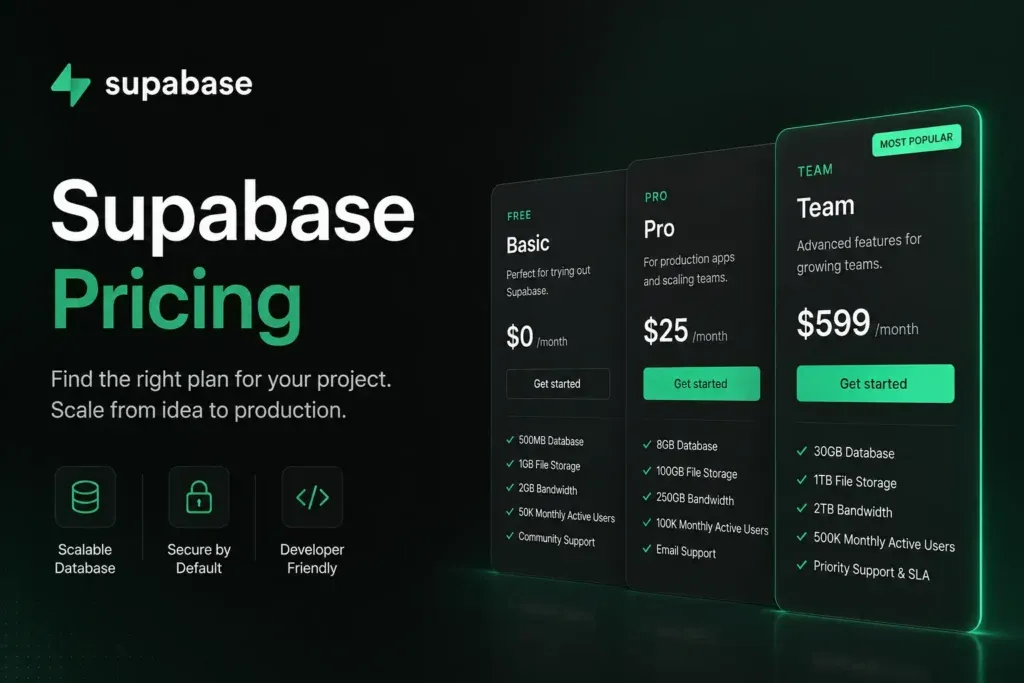
| Free | Pro | Team | Enterprise | |
|---|---|---|---|---|
| Price | from $0/month | from $25/month | from $599/month | Custom |
| Database | 500 MB (Shared CPU, 500 MB RAM) | 8 GB disk per project, then $0.125/GB | 8 GB disk per project, then $0.125/GB | Custom |
| Egress | 5 GB plus 5 GB cached | 250 GB (then $0.09/GB) plus 250 GB cached (then $0.03/GB) | 250 GB plus 250 GB cached | Custom |
| Monthly active users | 50,000 | 100,000 (then $0.00325/MAU) | 100,000, then $0.00325/MAU | Custom |
| File storage | 1 GB | 100 GB (then $0.0213/GB) | 100 GB, then $0.0213/GB | Custom |
| Backups | None | Daily, retained 7 days | Daily, retained 14 days | Custom |
| Log retention | None | 7 days | 28 days | Custom |
| Pause on inactivity | Yes, after 1 week | No | No | No |
The $25 to $599 gap
This is the largest single jump in the hosting category we track, and it deserves scrutiny rather than acceptance.
Moving from Pro to Team multiplies your bill by roughly twenty-four times while the headline resource allowances - 8 GB disk, 250 GB egress, 100,000 monthly active users, 100 GB storage - stay identical.
What actually changes is operational depth: backup retention goes from 7 to 14 days, and log retention from 7 to 28 days. Those are real capabilities for a team with compliance obligations or incident-review requirements. Twenty-eight days of logs means you can investigate a pattern reported at the end of a month. Seven days means you cannot.
But they are not capacity, and the practical reading follows directly: do not upgrade to Team because you are running out of resources. Resources are bought through overage pricing at the rates in the table, which is dramatically cheaper. Upgrade to Team when your organisation requires the longer retention windows, or when a compliance questionnaire asks a question that Pro cannot answer.
Overage rates and what they mean
Because the allowances are identical across Pro and Team, the overage rates are what govern cost at scale: $0.125/GB disk, $0.09/GB egress, $0.00325/MAU, $0.0213/GB file storage.
Our own arithmetic for a Pro project running at double every included allowance - 16 GB disk, 500 GB egress, 200,000 monthly active users, 200 GB file storage:
| Resource | Overage | Rate | Cost |
|---|---|---|---|
| Disk | 8 GB | $0.125/GB | $1.00 |
| Egress | 250 GB | $0.09/GB | $22.50 |
| Monthly active users | 100,000 | $0.00325 | $325.00 |
| File storage | 100 GB | $0.0213/GB | $2.13 |
| Base plus overage | around $375 |
Two conclusions fall out of that. First, even at double every allowance, Pro plus overage remains below the $599 Team base price - reinforcing that Team is not a capacity purchase. Second, monthly active users dominate the overage bill by an order of magnitude. If your product has a large user base with modest per-user data, that is the line to model carefully; disk and storage are rounding errors by comparison.
What Shipped in 2026
Supabase’s 2026 releases cluster around two themes: reducing the operational knowledge required to run Postgres well, and answering the vector-scaling limit described above.
- Stripe Sync Engine integrated directly into the dashboard, removing a common piece of glue code that most SaaS teams write and maintain themselves.
- Index Advisor in the Table Editor, surfacing missing indexes without requiring you to read query plans by hand. This is the clearest example of the first theme - index selection is exactly the kind of Postgres expertise that separates a fast database from a slow one, and most application developers do not have it.
- PostgREST v14 on the Data API.
- Supabase Vector Buckets, now manageable from the dashboard, for storing, indexing and querying vector embeddings at scale.
- A published 2026 security roadmap.
Vector Buckets is the strategically interesting one, because it is Supabase’s answer to the pgvector ceiling. But it is in public alpha, and that status should govern how you treat it. It is a signal about direction, not a component to put under production traffic yet. If your vector workload is approaching the threshold today, plan around pgvector’s current limits and treat Vector Buckets as a future option rather than a present solution.
Support Reality Check
One limitation deserves to be stated plainly rather than buried. There is no live chat on any plan, including Enterprise, and no phone support at any tier.
For a solo developer or a small team comfortable with documentation and community forums, this is a non-issue. Supabase’s documentation is genuinely good, and the community is active and technically competent.
For an organisation whose incident process assumes a vendor phone number exists, it is a procurement blocker - and considerably better discovered during evaluation than during an outage at two in the morning.
Note: this is drawn from third-party reporting rather than an explicit statement in Supabase’s own support documentation. Verify against your contract terms before relying on it either way.
Who Should Use Supabase, and Who Should Not
Strong fit: teams that want authentication, database, storage and realtime configured once rather than assembled from four vendors; TypeScript codebases, where generated types are a substantial ongoing saving; multi-tenant applications that benefit from database-level isolation; AI features needing vector search at moderate scale; anyone who values being able to leave, since the data is standard Postgres and the migration path is a pg_dump.
Poor fit: vector workloads beyond roughly 10 million embeddings; latency-critical synchronous paths that cannot absorb edge-function cold starts; organisations requiring phone or live-chat support; projects that need to stay reachable but cannot justify leaving the free tier; teams without anyone who understands row-level security well enough to review policies.
Head-to-Head Comparisons
- Supabase vs Railway: both host Postgres with different priorities. Supabase bundles authentication, storage and realtime around the database and treats it as the product; Railway treats the database as one service among many in a broader application platform. Full breakdown in Supabase vs Railway.
- Supabase vs Vercel: complementary, not competing. Vercel runs the application; Supabase holds the data. The common architecture uses both.
- Supabase plus Lovable: Supabase is the default backend that Lovable generates against, which is worth knowing before you evaluate either in isolation - choosing Lovable means choosing Supabase.
- Supabase vs Firebase: the comparison the marketing invites. The substantive difference is that Postgres is a relational database with a portable schema, and Firestore is not. If you expect to need joins, constraints or an exit, that difference outweighs feature-by-feature comparison.
Plan pricing, allowances, overage rates and pause policy in this review were verified against Supabase’s official pricing page and changelog on 16 August 2026. The overage cost model is our own arithmetic from those published rates. The pgvector scaling threshold, edge-function cold-start range and support-channel limitations come from third-party technical analysis and are labelled as such. Vector Buckets is in public alpha at the time of writing. Confirm current terms at supabase.com before committing.
Evaluation Metrics
Accuracy in parsing call graphs, types, and catching subtle edge cases without noise.
Average execution time under 45s across PR triggers on GitHub Actions & GitLab CI.
Detection rate of OWASP Top 10 flaws, SQL injection risks, and leaked API secrets.
Time saved per senior reviewer and ease of interactive inline PR code chat.
Pros & Cons
What We Like (Pros)
- Real Postgres, so schema, extensions and data stay portable if you leave
- TypeScript types generated from the schema remove manual type maintenance
- Auth, realtime, storage, edge functions and pgvector ship in one project
- Row-level security enforces tenant isolation at the database layer
Considerations (Cons)
- Free projects are paused after one week of inactivity, with a limit of two active projects
- A wrong row-level security policy fails silently, returning zero rows with no error
- The step from Pro to Team is $25 to $599 with nothing in between
- Vector Buckets, the answer to pgvector scaling limits, is still in public alpha
Supabase vs the Closest Alternatives
Alternatives named in this review, not tools that merely share a category.
| Feature Matrix |  Supabase Reviewed Tool |  Railway | Firebase Not reviewed here |
|---|---|---|---|
| Rating Score | 4.9 / 5.0 | 4.8 / 5.0 | Not rated by us |
| Pricing Model | Free • Pro from $25/mo • Team from $599/mo • Enterprise custom | Free ($1 credit/mo) • Hobby $5/mo • Pro $20/mo per workspace | Spark free - Blaze pay-as-you-go at Google Cloud rates |
| Best For | Teams that want authentication, database, storage and realtime configured once rather than assembled from four vendors; TypeScript codebases, where generated types are a substantial ongoing saving. | Long-running services, background workers and cron jobs that serverless platforms handle awkwardly; monorepos with several services that need to talk to each other. | Projects that will never need joins, constraints or an exit path |
| Key Differentiator | Postgres with auth, storage, realtime and pgvector configured together | Per-second-metered containers for long-running services, workers and cron jobs | Firestore is not relational: no joins, constraints or portable schema |
| Action / Review | Try Free | Read Review |
Full breakdown: Supabase vs Railway.
Frequently Asked Questions
Does Supabase train AI models on private repository code?
No. Supabase strictly adheres to zero-data-retention standards. Code diffs and repository context are processed in ephemeral memory for the duration of the review execution and are never stored or used to train public models.
How do I configure custom coding standards and linters?
Supabase reads a repository configuration file placed in the root directory. You can define rule severity, exclude specific paths, set language guidelines, and prompt instructions matching your team's style guide.
Is Supabase free for open-source software projects?
Public open-source repositories hosted on GitHub and GitLab receive free automated reviews with no cap on the number of repositories, pull requests, or contributors.
Which languages and frameworks does Supabase support?
Supabase covers the mainstream ecosystem - TypeScript/JavaScript, Python, Go, Java, Ruby, PHP, Rust, and C# - along with infrastructure-as-code formats such as Terraform, Dockerfiles, and Kubernetes manifests.
How does Supabase handle security scanning?
Supabase scans every incoming commit for hardcoded API keys, database credentials, SQL injection risks, and OWASP Top 10 security vulnerabilities before code is merged into production. High-priority security alerts are flagged directly inline within the pull request.


